

Mobile app
Your store, in the palm of your hand
Reply to chats, accept orders, send quotes, and keep an eye on your store from your phone. The Conex Bisnis Android app is coming soon to Google Play. In the meantime, the business.conex.chat dashboard already works great in your phone's browser.
- Plan
- Free
- In the dashboard
- business.conex.chat in your phone's browser
- Group
- Integrations & Apps
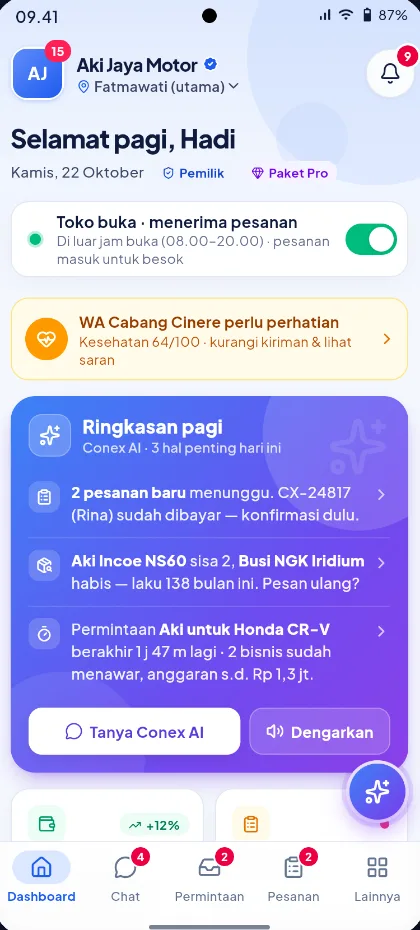
What it is
Mobile app
You can run Conex Bisnis from your phone: the business.conex.chat dashboard adapts to small screens with a bottom menu, while the Conex Bisnis Android app is being prepared for Google Play.
Who it's for
- Business owners who use their phone more than a laptop.
- Staff who reply to chats or update orders while working in the field.
- Owners of several businesses who want to switch between them quickly.
- Businesses that don't have a computer in the store yet.
What you get
The mobile app in Conex Bisnis
Chat on every channel
One inbox for Conex, WhatsApp, Telegram, and Live Chat, right from your phone.
Requests & orders
Reply to quote requests and process orders and bookings from anywhere.
Connect WhatsApp
Connect and monitor your business WhatsApp number right from your phone.
Products, schedules & promos
Edit products, manage schedules, and run promos without opening a laptop.
Many businesses, one account
Run several businesses or work as staff at another? Switch businesses with a single tap.
System integrations on the web
KasirXpert and Halobengkel sync, CSV import, and the API are set up from the web dashboard.
App status
- AndroidIn testing, coming soon to Google Play.
- iPhone (iOS)Not available yet. Use the web dashboard in Safari.
How it works
Step by step in the dashboard
Menu names match business.conex.chat (in Indonesian).
- 1
Open business.conex.chat in your phone's browser
Sign in with your WhatsApp number just like on a laptop. Your data and settings are exactly the same.
- 2
Use the bottom menu
Dashboard, Chat, one tab that follows your business modules (such as Kalender (Calendar), Jadwal (Schedule), Permintaan (Requests), or Produk (Products)), Pesanan (Orders), and Lainnya (More).
- 3
Find other menus under Lainnya (More)
Menus outside the main tabs are grouped like the desktop sidebar. A red dot means something needs checking, such as a new request.
- 4
Set the appearance
Choose the Terang (Light), Gelap (Dark), or Ikuti sistem (Follow system) theme. The choice applies to that device only.
- 5
Switch businesses
Tap the business name at the top to switch businesses or register a new business from the same account.
Key settings
- Theme
- Terang (Light, default), Gelap (Dark), or Ikuti sistem (Follow system), with a quick toggle at the top of the dashboard.
- Module tab
- The third tab in the bottom menu follows the modules turned on in Fitur Bisnis (Business features).
- Notifications
- Notification history can be filtered by type, grouped by day, and marked as read all at once.
Limits & rules
- Android app
- In testing and coming soon to Google Play. Push notifications for the mobile app are on the way.
- iPhone
- There's no iOS app yet. Use the web dashboard in Safari.
- System integrations
- In the Android app, integration settings cover chat channels like WhatsApp only. KasirXpert, Halobengkel, CSV, and the API are set up from the web dashboard.
- Theme per device
- Your theme choice doesn't carry over to other devices. Printed receipts and labels always use the light theme.
Use cases
Used across many businesses
Home services
An AC technician replies to requests and updates job status right from their phone at the customer's location.
Home services solutionsSalons & beauty
A salon owner checks today's bookings from the schedule tab in the bottom menu before the store opens.
Salon & barbershop solutionsSolo business
A home-based seller handles chats, orders, and the catalog entirely from one phone.
Solo business solutionsIntegration with other features
Works together with other features
Problems it solves
This feature helps when…
FAQ
Mobile app FAQ
Where can I download the Conex Bisnis app?
The Android app is coming soon to Google Play. In the meantime, open business.conex.chat in your phone's browser. All the main features work from there.
Is there an iPhone version?
Not yet. iPhone users can use the business.conex.chat dashboard in Safari.
Is the data on my phone and laptop the same?
Yes. The mobile app and the web dashboard use the same account and data.
Is there a dark mode?
Yes. Choose Terang (Light), Gelap (Dark), or Ikuti sistem (Follow system). Your choice is saved on the device you're using, while printed receipts and labels always stay light.
What if I manage several businesses?
Tap the business name at the top to switch. One account can manage several businesses or be a staff member at other businesses.
Do notifications come to my phone?
Notifications are always recorded in the bell and the Notifikasi (Notifications) menu when the dashboard is open. Push notifications for the Android app are on the way.
Can I connect my POS from my phone?
In the Android app, you set up chat channels such as WhatsApp. System integrations like KasirXpert, Halobengkel, CSV import, and the API are set up from the web dashboard.
Related
Related features & solutions
Omnichannel
Conex Chat, WhatsApp, Telegram & website Live Chat in one inbox.
Learn more FreeOrders & couriers
Orders and bookings in one list, plus your own trackable couriers.
Learn more FreeProTeam, contacts & broadcasts
Staff & roles, customer contacts, pipeline, and opt-in broadcasts.
Learn more Business sizeSolo business
Run it yourself: Free plan, WhatsApp via QR scan, AI bot, from your phone.
See solutionTry Conex Bisnis for free
Register with your WhatsApp number, fill in your profile, and start receiving chats today.
