

Bos AI
An AI manager that works while you rest
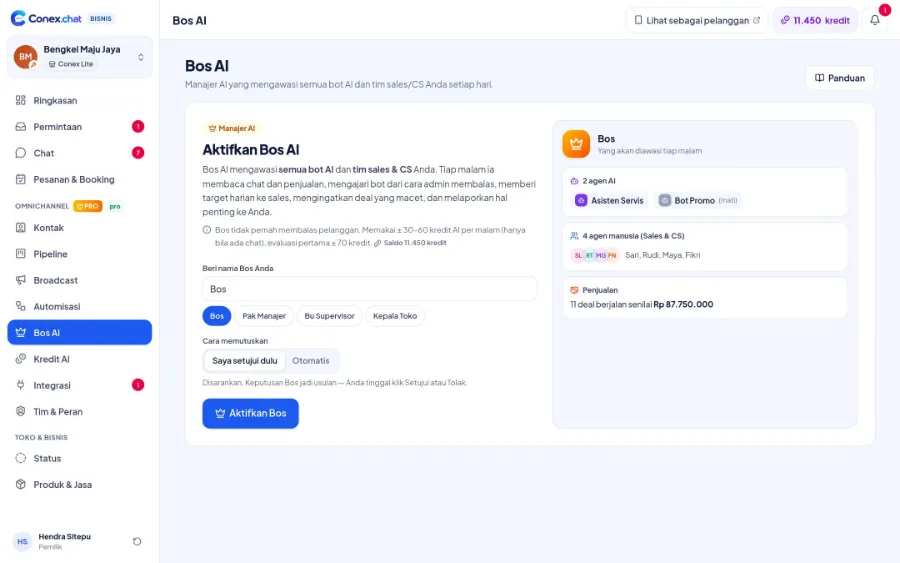
Every night, Bos AI reads the day's data, reviews your bots and staff, writes lessons for the bots, sets daily targets for each staff member, and flags issues like disconnected channels or chats without an owner. In "Saya setujui dulu" (I approve first) mode, every suggestion waits for your decision.
- Plan
- Pro
- In the dashboard
- Bos AI
- Group
- AI & Automation
What it is
Bos AI
An AI supervisor that reviews your bots' and staff's performance every night, then prepares lessons, targets, and alerts for you to decide on.
Who it's for
- Owners who don't have time to read every chat
- Businesses with several bots and CS or sales staff
- Managers who want data-driven daily targets
- Sales teams whose pipeline is getting busy
What you get
Bos AI in Conex Bisnis
Reviews bots & staff
Assessments based on real data, including staff response times.
Lessons for the bot
The best answers are suggested as new bot knowledge.
Daily targets
For example, "reply to chats that are still waiting" for each staff member.
Escalation
Disconnected channels, a bot that's down, or chats without an owner are flagged to the owner.
Stalled deals
Suggests a follow-up or a new owner for stalled deals.
Ask the Boss
Ask about how your business is doing and get answers from your own data.
Good to know
- CreditsEach review uses AI credits.
- ReportsReports are sent as dashboard notifications. Reports via WhatsApp aren't available yet.
- CustomersBos AI never replies to customers.
How it works
Step by step in the dashboard
Menu names match business.conex.chat (in Indonesian).
- 1
Turn it on in the Bos AI menu
Give it a name, choose the decision mode, and set the daily review time, ideally when the store is closed.
- 2
Let the nightly review run
The Boss reviews your bots and staff using the day's data, including late replies and deals that have gone quiet too long.
- 3
Review lessons for the bot
Suggested lessons on knowledge, style, processes, or restrictions are approved or rejected before the bot uses them.
- 4
Review decisions for the team
Daily targets, coaching notes, and follow-up suggestions for stalled deals wait for your approval.
- 5
Set chat assignment rules
For example, new leads get a bot reply first, high purchase intent goes to a human sales rep, complaints go to senior CS, and overnight leads become sales targets for the next morning.
- 6
Ask the Boss
Ask questions about how your business is doing and get answers from your own data.
Key settings
- Decision mode
- "Saya setujui dulu" (I approve first), or automatic: decisions take effect right away and can be undone.
- Daily review time
- Choose the time; the default is 02:00.
- Late chats
- How many minutes before a chat counts as a late reply.
- Stalled deals
- How many days without activity before a deal counts as stalled.
- Active lesson limit per bot
- When it's full, the oldest lessons are archived automatically so the bot doesn't get confused.
- Notes for staff
- Send coaching notes and targets to staff as notifications.
Limits & rules
- Plan
- Pro plan only. Bos AI stays off until the Owner or an Admin turns it on.
- Credits
- Each review uses AI credits. If there aren't enough credits, the review doesn't run.
- Daily summary
- Summaries are sent as dashboard notifications; delivery via WhatsApp isn't available yet.
- Behind the scenes
- Bos AI never sends messages to customers.
- Deals
- Follow-up or owner-change suggestions for deals require Pipeline.
Use cases
Used across many businesses
Workshops
The Boss notices many tire price questions being handed to staff, then suggests a pricing lesson based on a senior mechanic's answers.
Auto repair & automotive solutionProperty
Deals that have been quiet for more than three days are flagged to the owner, along with a suggested follow-up or a new owner.
Property solutionsRestaurants & cafés
A daily target of "reply to chats that are still waiting" is sent to the morning-shift admin as a notification.
Restaurant & café solutionIntegration with other features
Works together with other features
Problems it solves
This feature helps when…
No visibility into team performance
The owner can't tell who is slow to reply or which deals are stuck.
See how to fix itForgetting to follow up with prospects
Interested buyers never get contacted again.
See how to fix itCustomers keep asking the same things
Prices, location, and how to order are asked again and again, then answered by hand one by one.
See how to fix itWhatsApp number keeps disconnecting
The WhatsApp connection drops or the number gets restricted, and customer chats don't come in.
See how to fix itFAQ
Bos AI FAQ
Does Bos AI change settings on its own?
Not in "Saya setujui dulu" (I approve first) mode. Every suggestion waits for your approval. There's also an automatic mode if you choose it.
Which plan includes Bos AI?
The Pro plan. Bos AI stays off until you turn it on.
Does Bos AI read staff's private chats?
Bos AI reads business chats and sales data in Conex Bisnis, not chats outside Conex.
When does the review run?
Every night at the time you choose, 02:00 by default. You can also start a review manually from the Bos AI page.
What are lessons for the bot?
Suggestions for new knowledge, language style, processes, or restrictions, drawn from how your staff answer. Once approved, the bot uses them right away.
Can Bos AI be turned off?
Yes, anytime from the Bos AI settings. Existing history and decisions are kept.
Do staff get feedback from Bos AI?
If the setting is turned on, coaching notes and targets are sent to staff as notifications.
Related
Related features & solutions
Reports & summaries
Daily summaries, chats per channel, order reports with CSV.
Learn more FreeProAI bot & knowledge
How the bot answers: rule order, knowledge, testing, learning.
Learn more ProSales pipeline
Deals from chat, stage presets, automations, kanban & table views (Pro).
Learn more TeamsBusiness owners
Daily summaries, order reports, Bos AI, roles & permissions.
See solutionTry Conex Bisnis for free
Register with your WhatsApp number, fill in your profile, and start receiving chats today.
