

Small business with a team
Your team grows, your service stays organized
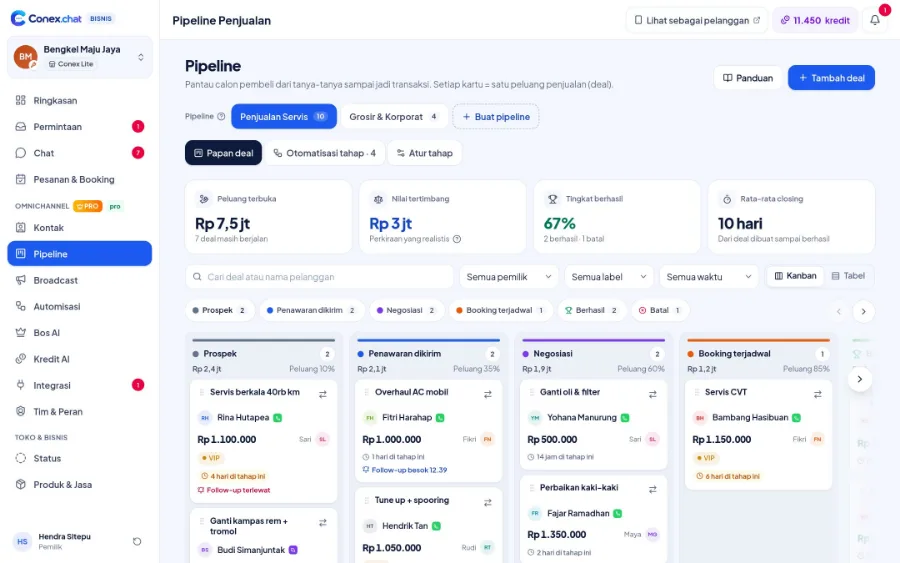
Each staff member has their own account and role. Chats can be transferred or assigned automatically, prospects are tracked in the pipeline, and Bos AI helps owners see how the bot and team are performing every day.

Illustration with sample data
Real challenges
What often happens without a system
Shared accounts
It's unclear who replied to what.
Uneven workload
The fastest staff member is always flooded with chats.
Performance you can't see
Owners don't know who's slow to reply.
Before vs after
What changes with Conex Bisnis
Solutions
Mapped to Conex features
One account per staff member
Invite staff and set their roles.
Team, contacts & broadcastsAutomatic chat assignment
Round-robin, least busy, or a manual queue (Pro).
Customer serviceCustom roles
Control who can view, reply, or change settings (Pro).
Team, contacts & broadcastsPipeline
Track prospects together (Pro).
Leads, pipeline & B2B quotesBroadcast
Opt-in promos for the marketing team (Pro).
MarketingBos AI
An AI manager for your bot and team (Pro).
Business ownersSample flow
From the first chat to completion
Illustrated flow with sample data.
- 1
Invite staff and choose their roles
- 2
Set up chat assignment for the team (Pro)
- 3
The team handles chats, orders, and deals
- 4
The owner keeps track through Ringkasan (Overview) and Bos AI
Get started in 15 minutes
Setup checklist
Real steps in the business.conex.chat dashboard.
- Register at business.conex.chat with your WhatsApp number, choose your business category, then fill in the name, address, and map pin.
- Invite staff in the Tim & Peran (Team & Roles) menu, then share the invite link via WhatsApp.
- Open Integrasi › Kanal chat (Integrations › Chat channels), choose WhatsApp, then scan the QR code from your phone or enter the 8-letter code.
- Pro create teams/divisions and set up chat assignment.
- Pro create a pipeline from a preset (services, products, wholesale/B2B, or pre-order) in the Pipeline menu.
- Pro turn on Bos AI in the Bos AI menu with the "Saya setujui dulu" (I approve first) mode.
Features by plan
What you get on Free and Pro
No quota numbers here; each plan's quota is shown in the Paket & Kuota (Plans & Quotas) menu.
Free No time limit
Pro Rp149.000/month or Rp1.490.000/year. Compare plans
Good to know
- Teams & branchesInbox teams/divisions aren't tied to branches yet. Staff access can be limited by branch.
- ChannelsOfficial WhatsApp API, Instagram DM, and Messenger are coming soon. For now, WhatsApp connects by scanning a QR code.
FAQ
Small businesses with teams FAQ
How many staff can I add?
The Free plan is for small teams, and Pro is for bigger teams. The exact numbers are shown in the Paket & Kuota (Plans & Quotas) menu.
Can I try Pro?
Pro activation is currently handled with help from the Conex team. Send a request from the Bantuan (Help) menu in the dashboard.
How do staff sign in?
Staff receive an invitation, then sign in with their own account.
Related solutions
See it from another angle
Customer service
Shared inbox, chat assignment, notes, and AI Suggestions.
See solution TeamsSales
Pipeline, quotes, stage automations, and Bos AI daily targets.
See solution TeamsBusiness owners
Daily summaries, order reports, Bos AI, roles & permissions.
See solution Business sizeMulti-branch & franchise
Branches within one business, or several businesses under one account.
See solutionTry Conex Bisnis for small businesses with teams
Register for free with your WhatsApp number, then follow the checklist above. Upgrade to Pro anytime.