

Catering & food
Event orders, from first question to delivery
A customer asks about a menu for 100 people on Saturday. You reply with a quote listing the menu and prices, the customer negotiates or accepts, and the order comes in complete with the date and delivery address.
Listed in the Conex app under the Food category.
- Catering
- Groceries
Illustration with sample data
Real challenges
What often happens without a system
Order details keep changing
Portions, menu, and event date change midway through the conversation.
Recalculating prices
Every order change means recalculating and resending the price.
Clashing delivery schedules
Several orders on the same day are hard to schedule for delivery.
Before vs after
What changes with Conex Bisnis
Solutions
Mapped to Conex features
Menu & portion quotes
Send quotes with the menu, number of portions, and price. Changes made through negotiation are versioned.
All the way to checkoutOrder dates
Orders are saved complete with their date and schedule.
Catalog & ordering optionsYour own delivery
Deliver with your own couriers through Conex Kurir, with zone-based delivery fees.
Orders & couriersAI bot answers menu questions
Questions about the menu, starting prices, and minimum orders are answered by the bot.
Answered by AIPromos & vouchers
Create promos for new or loyal customers.
Catalog & ordering optionsOne inbox
Orders from Conex Chat and WhatsApp are handled by the same team.
OmnichannelBusiness features prepared for this business type
- Request quotes & negotiate
- Service booking
- Delivery & in-house couriers
- Direct orders & cart
- Stock & variants
- Wholesale pricing
- Discounts, promos & vouchers
- Multi-branch
- KasirXpert & Halobengkel integration
Can be turned on or off anytime in the Fitur Bisnis (Business features) menu.
From the customer's side
How customers find you and order
Your business shows up in the Conex app, where people search, ask, and order through chat.
Request a quote
Customers describe their event needs and receive quotes from several caterers at once.
Request quotes & negotiateDirect chat
Menu details and changes are discussed in chat, including sample photos of dishes.
Chat with businessesTrack orders
Customers track the order stage until it's delivered.
Track ordersSample flow
From the first chat to completion
Illustrated flow with sample data.
- 1
The customer sends their event needs
- 2
You reply with a menu and price quote
- 3
The customer negotiates the number of portions, then accepts
- 4
The order is scheduled and delivered by your courier
Get started in 15 minutes
Setup checklist
Real steps in the business.conex.chat dashboard.
- Register at business.conex.chat with your WhatsApp number, choose your business category, then fill in the name, address, and map pin.
- Add products or services in the Produk & Jasa (Products & Services) menu, with photos, prices, and variants.
- Make sure Minta penawaran & nego (Request quotes & negotiate) is on in Fitur Bisnis (Business features), then keep an eye on the Permintaan (Requests) menu.
- Set up delivery zones and invite couriers in the Kurir (Couriers) menu.
- Open Automisasi (Automation), fill in the bot's knowledge, try it in the test panel, then turn the bot on.
- Post your first Status, such as a promo or today's menu, for your followers.
Features by plan
What you get on Free and Pro
No quota numbers here; each plan's quota is shown in the Paket & Kuota (Plans & Quotas) menu.
Free No time limit
- Conex Chat & WhatsApp inbox
- WhatsApp via QR scan (up to 2 numbers on Free)
- AI bot with business knowledge
- Public profile & catalog on Conex and Google
- Quotes & negotiation in chat
- Service booking
- Store couriers & delivery fees by zone
- Discounts, promos & targeted vouchers
- 24-hour Business Status for followers
Pro Rp149.000/month or Rp1.490.000/year. Compare plans
Good to know
- PaymentFor now, payment is made in person. Online payment (QRIS, virtual accounts, e-wallets) is coming soon for verified businesses.
- Pre-orderPre-orders with a down payment are waiting on online payments, which are coming soon.
FAQ
Questions about catering & food
Can customers change the number of portions after a quote?
Yes, through negotiation. The customer changes the quantity or items, and you accept or reply with a new quote. Every version is saved.
Do you support down payments?
Online down payments require online payments, which are coming soon for verified businesses. For now, payment is made in person.
What about regular daily orders?
Turn on the cart in Fitur Bisnis (Business features) so customers can order products straight from your catalog.
Related solutions
See it from another angle
Restaurants & cafés
Menus with variants, pickup or delivery orders, promos via Status.
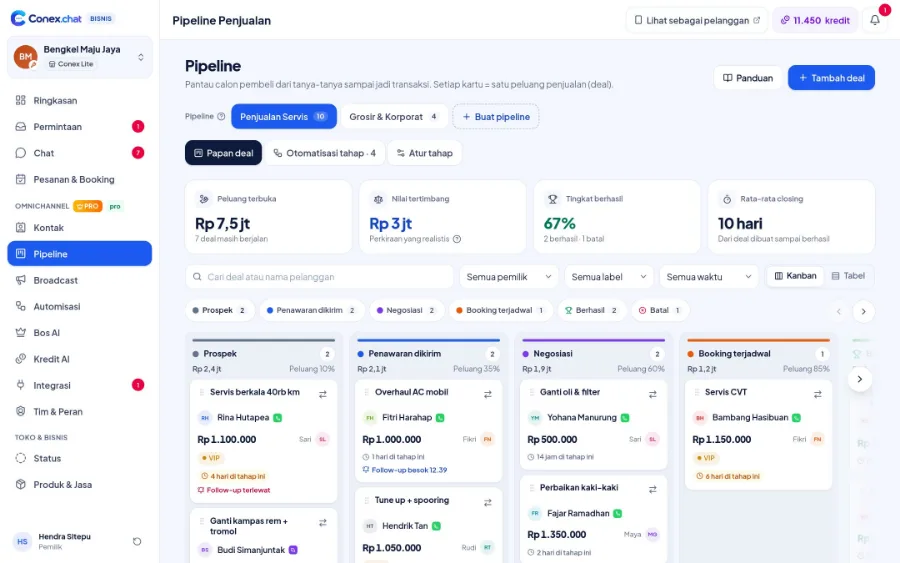
See solution NeedsLeads, pipeline & B2B quotes
Deals from chat, pipeline presets, stage automations, negotiations on record.
See solution TeamsSales
Pipeline, quotes, stage automations, and Bos AI daily targets.
See solution Needs24/7 auto-replies with AI
AI bot powered by your business knowledge, handing over to staff when unsure.
See solutionTry Conex Bisnis for catering & food
Register for free with your WhatsApp number, then follow the checklist above. Upgrade to Pro anytime.
