

Business Status
Fresh updates, straight to your followers
Post promos, events, or daily updates to Status. Followers see it in the Conex app for 24 hours, can tap action buttons, and their replies land in your business chat.
- Plan
- Free
- In the dashboard
- Status
What it is
Business Status
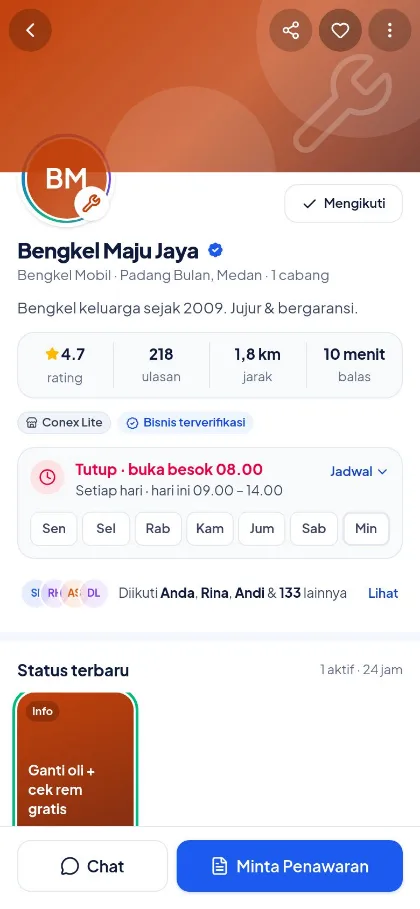
Business Status is a short post (text, photo, video, product, or promo) shown to followers in the Conex app for 24 hours, after which it disappears on its own.
Who it's for
- Restaurants and cafes sharing a daily menu
- Stores announcing new products
- Class or event organizers
- Businesses that want to stay in touch with followers without broadcasts
What you get
Business Status in Conex Bisnis
Live for 24 hours
Status disappears automatically after 24 hours.
Promo & event labels
Tag the Status type so it's easy to recognize.
Action buttons
Point followers to the next step.
Write with AI
AI help to draft your Status text.
Replies to chat
Follower replies land in your inbox.
Followers
See who follows your business.
How it works
Step by step in the dashboard
Menu names match business.conex.chat (in Indonesian).
- 1
Choose a Status type
In the Status menu, choose text, photo, video, a product from your catalog, or a promo.
- 2
Write the content
Enter a title and text, or tap "Tulis dengan AI" (Write with AI) for a draft based on your profile and catalog.
- 3
Add a label & button
Choose the Produk baru (New product), Info, Event, or Promo label, then the Beli Sekarang (Buy now), Minta Penawaran (Request a quote), or Chat action button.
- 4
Publish
Your Status appears to followers in the Conex app and on your business profile for 24 hours.
- 5
Track & reply
See view and like counts. Follower replies land in your inbox as chats.
Key settings
- Status types
- Text, one photo, one video, a catalog product, or a promo with a code.
- Labels
- New product, Info, Event with its date and time, or Promo.
- Action buttons
- Buy now, Request a quote, or Chat.
- Write with AI
- A draft title, body, and suggested buttons based on your business profile and catalog.
Limits & rules
- Duration
- Each Status is shown for 24 hours.
- Limits
- Up to 30 active Status posts per business, with a limit on new posts per 24 hours. Deleted posts still count.
- Text length
- Titles up to 80 characters and body text up to 700 characters.
- One media item
- Each Status holds one photo or one video. Event dates can be up to one year ahead.
- AI help
- Write with AI has usage limits per business and per hour. If you hit the limit, write it yourself for now.
Use cases
Used across many businesses
Restaurants & cafés
A photo of today's special with the Info label and a Chat button for delivery orders.
Restaurant & café solutionGyms & fitness
An Event Status for a weekend class, complete with the event time and a Request a quote button for training packages.
Gym & fitness solutionsFashion & boutiques
A product Status for a newly arrived collection with a Buy now button.
Fashion & boutique solutionsIntegration with other features
Works together with other features
Problems it solves
This feature helps when…
Promos don't land or the number gets restricted
Promos go unread, or the number gets restricted for mass messaging.
See how to fix itHard to find on Google
People nearby don't know your business exists.
See how to fix itPast customers don't come back
Customers buy once and then disappear, and no one invites them back.
See how to fix itFAQ
Questions about Business Status
Who sees a Status?
Your business's followers in the Conex app, plus visitors to your business profile while the Status is live.
Is Status sent via WhatsApp?
No. Status appears in the Conex app. To message WhatsApp contacts, use opt-in broadcasts (Pro).
How many Status posts can I upload?
Up to 30 active Status posts at a time, with a limit on new posts per 24 hours.
Can I upload videos?
Yes. Each Status holds one photo or one video.
How does Tulis dengan AI (Write with AI) work?
Conex AI drafts the title, body, and suggested buttons from your profile and catalog. Review and edit the draft before publishing.
Where do follower replies go?
To your inbox as a chat, so you can carry on like any other conversation.
Is Status a paid feature?
No. Status is available on every plan.
Related
Related features & solutions
Vouchers, discounts & promos
Targeted vouchers, automatic discounts, and purchase promos.
Learn more FreeGet found by buyers
Free profile & catalog on Conex and Google, plus Conex AI recommendations.
Learn more ProOpt-in broadcasts
Opt-in, smart segments, scheduling, safe pacing, STOP, reports (Pro).
Learn more TeamsMarketing
Opt-in broadcasts, smart segments, Status, targeted vouchers.
See solutionTry Conex Bisnis for free
Register with your WhatsApp number, fill in your profile, and start receiving chats today.
