

Leads & pipeline
Every lead has a stage and an owner
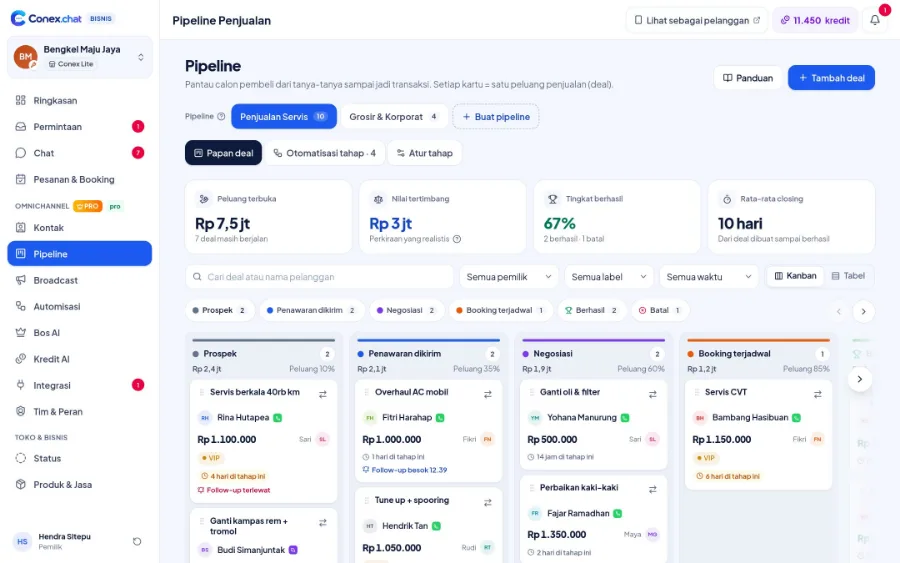
Deals are created right from the chat and given a value. Kanban or table pipelines show their stage, stage automations set reminders and send messages, and every version of a negotiated quote is recorded until it's accepted.
Illustration with sample data
Real challenges
What often happens without a system
Leaky leads
Interested buyers never get followed up.
Unclear lead ownership
Two sales reps contact the same customer, or nobody does.
Negotiations with no paper trail
Agreed prices are hard to trace.
Before vs after
What changes with Conex Bisnis
Solutions
Mapped to Conex features
Kanban & table pipeline
Deal values by stage, with service, product, wholesale/B2B, pre-order, or blank presets (Pro).
Team, contacts & broadcastsDeals from chat
Create deals right from the customer profile panel (Pro).
Team, contacts & broadcastsStage automations
Add a label, hand off to a team member, set a reminder, or send a message when a deal changes stage (Pro).
Team, contacts & broadcastsQuotes & negotiation
Negotiation changes quantities or items, and every version is saved.
All the way to checkoutAssign leads to sales reps
Round-robin or least busy (Pro).
SalesBos AI for stalled deals
Bos AI flags stalled deals and suggests next steps (Pro).
Answered by AISample flow
From the first chat to completion
Illustrated flow with sample data.
- 1
A lead comes in from chat or a quote request
- 2
Sales creates a deal and sends a quote
- 3
Stage automation sets a survey reminder
- 4
The negotiation is accepted and the deal is marked won
Get started in 15 minutes
Setup checklist
Real steps in the business.conex.chat dashboard.
- Register at business.conex.chat with your WhatsApp number, choose your business category, then fill in the name, address, and map pin.
- Open Integrasi › Kanal chat (Integrations › Chat channels), choose WhatsApp, then scan the QR code from your phone or enter the 8-letter code.
- Pro create a pipeline from a preset (services, products, wholesale/B2B, or pre-order) in the Pipeline menu.
- Invite staff in the Tim & Peran (Team & Roles) menu, then share the invite link via WhatsApp.
- Pro set up stage automations, such as a follow-up reminder 2 days after a quote.
- Pro turn on Bos AI in the Bos AI menu with the "Saya setujui dulu" (I approve first) mode.
Features by plan
What you get on Free and Pro
No quota numbers here; each plan's quota is shown in the Paket & Kuota (Plans & Quotas) menu.
Free No time limit
Pro Rp149.000/month or Rp1.490.000/year. Compare plans
Good to know
- Bos AI reportsBos AI's daily report arrives as a notification in the dashboard. Reports via WhatsApp aren't available yet.
- PresetsThere are no pipeline presets for property or education yet. Start from a blank pipeline and set up your own stages.
FAQ
Leads, pipeline & B2B quotes FAQ
Is the pipeline available on the Free plan?
No. Pipelines, stage automations, automatic chat assignment, and Bos AI are on the Pro plan.
Can quotes be sent from a deal?
Yes. The quote is sent to the customer's chat, and they can accept it or make a counteroffer.
Is there a B2B preset?
There's a Wholesale/B2B preset, alongside service, product, and pre-order presets.
Related solutions
See it from another angle
Sales
Pipeline, quotes, stage automations, and Bos AI daily targets.
See solution IndustriesDistributors & wholesale (B2B)
Wholesale prices, negotiable quotes, B2B pipeline, and a sales team.
See solution IndustriesProperty
Prospects from chat are logged in the pipeline and assigned to the sales team.
See solution IndustriesEducation & courses
Organized chats with prospective students, an AI bot that answers fees & schedules, and an enrollment pipeline.
See solutionTry Conex Bisnis for leads, pipeline & B2B quotes
Register for free with your WhatsApp number, then follow the checklist above. Upgrade to Pro anytime.
