

Omnichannel
Every customer chat, one inbox
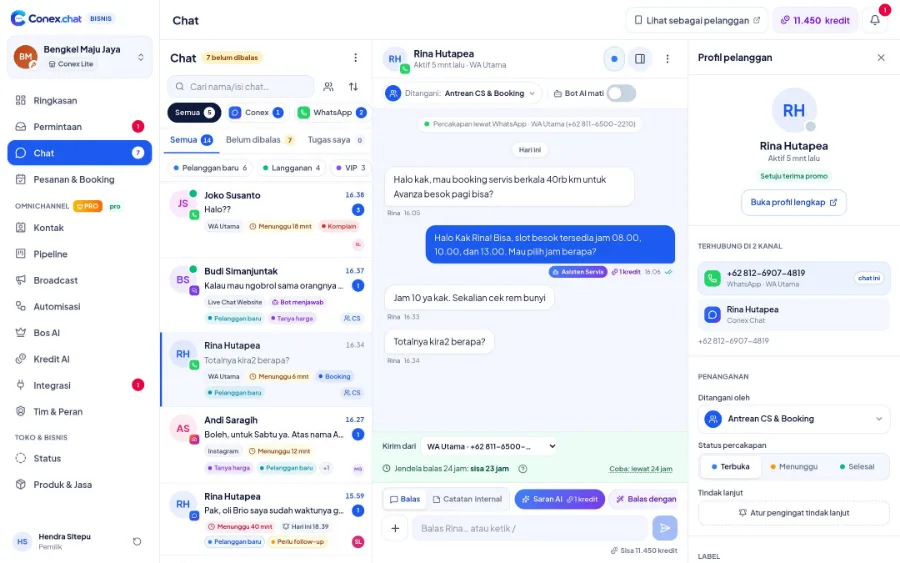
Chats from the Conex app, WhatsApp, Telegram, and the Live Chat on your website land on one screen, complete with customer history, labels, and who's handling each one. To connect WhatsApp, just scan a QR code. It's free.
- Plan
- FreePro
- In the dashboard
- Integrasi › Kanal chat (Integrations › Chat channels) · Chat
- Group
- Chat & Omnichannel

Illustration with sample data
What it is
Omnichannel
Omnichannel is the shared inbox in the Chat menu that collects conversations from the Conex app, connected WhatsApp numbers, Telegram bots, and the Live Chat widget on your website. Every chat remembers its source channel, so replies always go back to where the customer asked.
Who it's for
- Business owners who've been juggling several phones and chat apps at once.
- Customer service teams that need to work from one WhatsApp number without passing a phone around.
- Online stores that get questions from their website and Telegram as well as WhatsApp.
- Businesses that want customer chat history to stay intact even when admins change.
What you get
Omnichannel in Conex Bisnis
WhatsApp with just a QR scan
Connect the WhatsApp number you already use by scanning a QR code from your phone, just like opening WhatsApp on a laptop. Free for up to 2 numbers.
One inbox
Filter by channel, status, label, or "Tugas saya" (My tasks). Channel icons show where each chat came from.
Labels, statuses & notes
Use the Open, Pending, and Resolved statuses. Internal notes are visible only to your team, never to customers.
Share chats with your team
Transfer chats to teammates and see who's handling what. On the Pro plan, chats can be assigned automatically to teams or queues (customer service, bookings, complaints).
AI Suggestions
The AI drafts replies from your business knowledge and the conversation. Just send them or edit as needed.
Follow-up reminders
Schedule follow-ups from inside the chat so no prospective buyer slips through the cracks.
Channels coming soon
- Official WhatsApp APIFor sending messages at scale and using official templates.
- Instagram DM & MessengerAwaiting app review by Meta.
How it works
Step by step in the dashboard
Menu names match business.conex.chat (in Indonesian).
- 1
Open Integrasi › Kanal chat (Integrations › Chat channels)
Each channel appears as a card showing its connection status, message count, and an action button when something needs fixing.
- 2
Scan the QR code for WhatsApp
Choose Sambungkan WhatsApp (Connect WhatsApp), then on your phone open WhatsApp › Linked devices and scan the QR code shown in the dashboard.
- 3
Add Telegram or Live Chat (Pro)
For Telegram, paste the bot token from BotFather. For Live Chat, customize the widget, register your website domain, then add the code snippet to every page.
- 4
Send a test
Send a test message to your own number or account from that channel to make sure messages go out correctly.
- 5
Reply from the Chat menu
Filter with channel chips and the Belum dibalas (Unreplied), Tugas saya (My tasks), Follow-up, or Selesai (Resolved) tabs, then reply from the same box for any channel.
Key settings
- Chat list order
- Newest, Unread first, or Longest waiting, so the customers who've waited longest aren't missed.
- Filter by staff & label
- Show chats belonging to a specific member, unassigned chats, or chats with a specific label.
- Send from another number
- If more than one WhatsApp number is connected, replies can be sent from another of your business's WhatsApp numbers.
- Live Chat widget appearance
- Primary color, window title, opening greeting, pre-chat fields (name, WhatsApp number, email), online hours, and an offline message.
- Website domain
- The widget only appears on domains you register. Just copy the install code into your website.
Limits & rules
- WhatsApp on the Free plan
- Up to 2 numbers via QR scan. Disconnected numbers still count; to change numbers, disconnect the channel and reconnect with the new number.
- Telegram
- Each bot can connect to only one active channel, and only private chats with the bot come in. Messages in Telegram groups are ignored.
- Live Chat
- Visitors can send text and images up to 10 MB.
- When Pro ends
- Pro-only channels such as Telegram and Live Chat are paused, but their chat history stays readable.
- Channels not yet available
- The official WhatsApp API, Instagram DM, and Messenger are coming soon.
Feature details
Learn more in detail
Labels, notes & reminders
Inbox tools: labels, statuses, internal notes, quick replies, reminders.
Learn more ProChat assignment & teams
Chats assigned automatically by rotation or by workload (Pro).
Learn more FreeContacts & segments
One contact across many channels, segments, custom fields, duplicate merging, CSV.
Learn moreTelegram & website Live Chat on the Pro plan
For Telegram, paste the bot token from BotFather. For Live Chat, add one line of widget code to your website and set its color and greeting. Chats from both land in the same inbox.
Use cases
Used across many businesses
Online stores
Questions from the store website widget and from WhatsApp are handled by the same admins, so prices and stock answers are always consistent.
Online store solutionWorkshops
The workshop's WhatsApp number is connected via QR scan, while chats from the Conex app land in the same inbox for the head mechanic to manage.
Auto repair & automotive solutionCourses & education
Prospective students ask via Telegram or the website, and the admissions team answers them all from the Belum dibalas (Unreplied) tab without switching apps.
Education & course solutionsIntegration with other features
Works together with other features
Problems it solves
This feature helps when…
Chats pile up & replies are slow
Customers wait a long time because chats come in faster than you can reply.
See how to fix itCS team sharing one phone
One WhatsApp number is passed around between several admins.
See how to fix itWhatsApp number keeps disconnecting
The WhatsApp connection drops or the number gets restricted, and customer chats don't come in.
See how to fix itFAQ
Questions about omnichannel
Is connecting WhatsApp really free?
Yes. On the Free plan you can connect up to 2 WhatsApp numbers by scanning a QR code from the WhatsApp app on your phone. Chats to those numbers go straight into your Conex Bisnis inbox.
Which channels are available now?
Conex Chat and WhatsApp (QR scan) are available on every plan. Telegram and website Live Chat are available on the Pro plan. The official WhatsApp API, Instagram DM, and Messenger are coming soon.
Can several admins reply at the same time?
Yes. Invite staff with their own accounts. Everyone replies from the same inbox, based on their role permissions.
Is it safe for my WhatsApp number?
Use the connected number to serve customers who contact you. Avoid mass-messaging people who don't know you, as WhatsApp may restrict numbers reported as spam. For high-volume messaging, the official WhatsApp API is coming soon on the Pro plan.
What should I do if my WhatsApp number disconnects?
The channel card in Integrasi › Kanal chat (Integrations › Chat channels) flags disconnected numbers. Choose Hubungkan ulang (Reconnect), then scan the QR code again from WhatsApp › Linked devices so you don't miss customer messages.
How do I change my WhatsApp number on the Free plan?
A disconnected number still counts toward your 2-number allowance. Disconnect the old channel, then reconnect with the new number.
Do Telegram group messages come in too?
No. Only customers' private chats with your Telegram bot reach the inbox. Messages in Telegram groups or channels are ignored.
Do all staff see every chat?
It depends on their role. The Owner always sees every chat, while members with certain roles can be limited to their team's chats or the chats assigned to them.
Related
Related features & solutions
Answered by AI
24/7 AI bot, AI Suggestions, and Bos AI, all powered by your business knowledge.
Learn more FreeAll the way to checkout
Quotes, negotiation, cart, all the way to orders, all inside the chat.
Learn more FreeProTeam, contacts & broadcasts
Staff & roles, customer contacts, pipeline, and opt-in broadcasts.
Learn more ChannelsJust scan a QR code, free for up to 2 numbers. Official API coming soon.
See solutionTry Conex Bisnis for free
Register with your WhatsApp number, fill in your profile, and start receiving chats today.