

Team, contacts & broadcasts
One team, every customer taken care of
Invite CS and sales staff without sharing passwords. Contacts from every channel live in one list, sales opportunities are tracked in a pipeline, and promos only go to customers who agreed to receive them.
- Plan
- FreePro
- In the dashboard
- Tim & Peran (Team & Roles) · Kontak (Contacts) · Pipeline · Broadcast
- Group
- Team & Operations
What it is
Team, contacts & broadcasts
Team, contacts & broadcasts is the part of Conex Bisnis for managing people and customers: team members with clear roles, a contact list from every channel, a sales opportunity board, and bulk messages to customers who opted in.
Who it's for
- Owners starting to hire CS or sales staff who don't want to share passwords.
- Businesses whose customer lists are scattered across phones, notebooks, and spreadsheets.
- Sales teams that want to track prospects from the first chat to the closed deal.
- Businesses that regularly share promos with past customers (Pro).
What you get
Team, contacts & broadcasts in Conex Bisnis
Invite staff
Invite staff by email and share the link via WhatsApp if needed. Every staff member signs in with their own account.
Roles & permissions
Owner, Admin, Supervisor, and staff come with sensible default permissions. On the Pro plan, you can create your own roles.
Unified contacts
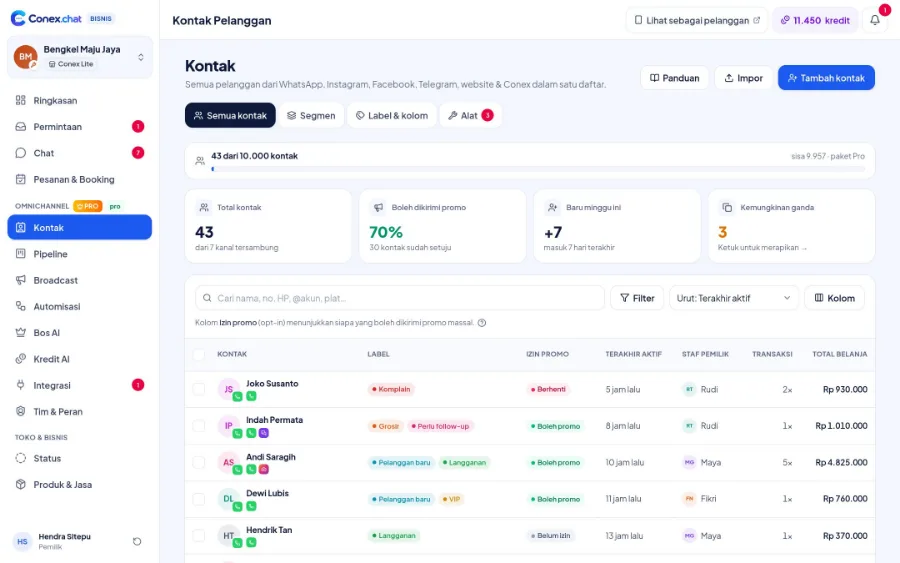
Contacts from chats are saved automatically, one contact across many channels. Add labels and custom fields, import from CSV, or merge duplicates.
Sales pipeline
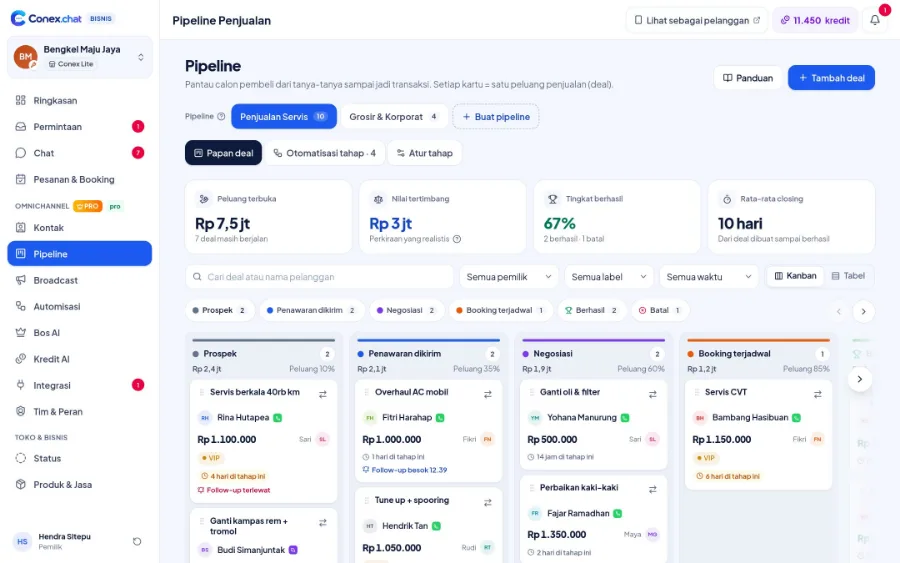
Track prospects from first questions to purchase on a stage board (Pro).
Opt-in broadcasts
Send promos or updates to contacts who opted in, with scheduling, follow-ups, and reports (Pro).
Unsubscribe
Recipients can opt out anytime, and anyone who has opted out is automatically skipped in future sends.
Send messages at scale
- Official WhatsApp APIFor large-volume WhatsApp broadcasts using official templates. Coming soon to the Pro plan.
How it works
Step by step in the dashboard
Menu names match business.conex.chat (in Indonesian).
- 1
Invite members in Tim & Peran (Team & Roles)
Enter the member's email and choose a role. You can also share the invite link yourself via WhatsApp.
- 2
Assign roles
Use the default Admin, Supervisor, or Agent roles. On the Pro plan, create your own roles and group members into teams.
- 3
Tidy up Kontak (Contacts)
Contacts from chats are saved automatically. Add labels and custom fields, merge duplicates, or import from CSV.
- 4
Track the Pipeline (Pro)
Create deals from chats and move them across the stage board until they close.
- 5
Send a Broadcast (Pro)
Choose recipients who opted in, send a test to your own number, schedule it, then check the report.
Key settings
- Permissions by role
- Control who can reply to chats, process orders, view reports, or edit the catalog.
- Teams/divisions (Pro)
- Group members into CS, sales, or bookings so chats and tasks go to the right place.
- Labels & custom fields
- Add your own labels and fields to contacts, such as city, customer type, or last service date.
- Recipient consent
- Send "Minta persetujuan" (Request consent) to contacts who haven't opted in; they just reply YA (YES) to start receiving broadcasts.
- Broadcast approval
- Staff can draft campaigns and submit them to an Admin before they're sent.
Limits & rules
- Invites
- Invites can only be accepted by a Conex account with the same email. Invites for the Admin role can only be sent by the owner.
- Member count
- Active members plus pending invites count toward your plan's staff quota.
- Pro only
- Pipeline, broadcasts, custom roles, and teams/divisions are only available on the Pro plan.
- Contact privacy
- Contacts from Conex app chats are saved without the customer's account phone number or email. Exporting contacts requires permission and is recorded in the audit trail.
Feature details
Learn more in detail
Roles & permissions
Owner, Admin, Supervisor, staff, and custom roles (Pro).
Learn more FreeContacts & segments
One contact across many channels, segments, custom fields, duplicate merging, CSV.
Learn more ProSales pipeline
Deals from chat, stage presets, automations, kanban & table views (Pro).
Learn more ProOpt-in broadcasts
Opt-in, smart segments, scheduling, safe pacing, STOP, reports (Pro).
Learn moreContacts from every channel, one list
Customers from Conex, WhatsApp, Telegram, and Live Chat are saved in one contact list, complete with labels and conversation history.
Use cases
Used across many businesses
Property
Every prospect from chat gets a deal, and agents move it from viewing to signing on the pipeline board.
Property solutionsGyms & fitness
Members are labeled by their training package, then new class updates are broadcast to members who opted in.
Gym & fitness solutionsTravel & tours
New staff are invited as Agents, while a Supervisor oversees team chats and the owner keeps control of settings.
Travel & tour solutionsIntegration with other features
Works together with other features
Problems it solves
This feature helps when…
Messy customer data
Contacts are scattered across phones, notebooks, and spreadsheets, with lots of duplicates.
See how to fix itForgetting to follow up with prospects
Interested buyers never get contacted again.
See how to fix itPromos don't land or the number gets restricted
Promos go unread, or the number gets restricted for mass messaging.
See how to fix itFAQ
Team, contacts & broadcasts FAQ
How do I invite staff?
In Tim & Peran (Team & Roles), enter the staff member's email and choose a role. The invite is sent to that email, and you can also share the link via WhatsApp. Staff accept the invite with a Conex account that uses the same email.
Can staff see sales reports?
It depends on their role. You decide each role's permissions, including access to reports and settings.
What's the difference between Admin, Supervisor, and Agent?
Admins have full access except plans and billing. Supervisors oversee team chats, contacts, pipeline, broadcasts, and reports. Agents reply to chats assigned to them and can view contacts. On the Pro plan, you can create your own roles.
Are broadcasts available on the Free plan?
Broadcasts and pipeline are available on the Pro plan. The Free plan already includes contacts, labels, and staff invites.
How do broadcasts protect my number?
Broadcasts only go to contacts who agreed to receive messages, include a way to opt out, and are sent gradually rather than all at once.
How do I get consent from existing customers?
Send "Minta persetujuan" (Request consent) from the Broadcast menu to contacts who haven't opted in yet. Contacts who reply YA (YES) can receive your next broadcasts.
Can duplicate contacts be merged?
Yes. Conex Bisnis detects contacts that are likely the same person, and you can merge them so chat history from several channels comes together.
Related
Related features & solutions
Omnichannel
Conex Chat, WhatsApp, Telegram & website Live Chat in one inbox.
Learn more FreeProAnswered by AI
24/7 AI bot, AI Suggestions, and Bos AI, all powered by your business knowledge.
Learn more FreeMobile app
Conex Bisnis for Android: chats, orders, and WhatsApp from your phone.
Learn more TeamsSales
Pipeline, quotes, stage automations, and Bos AI daily targets.
See solutionTry Conex Bisnis for free
Register with your WhatsApp number, fill in your profile, and start receiving chats today.
