Vehicle service
Car brakes squeaking? Tell Conex AI, get quotes from several workshops nearby, pick a time, then keep the history in My Assets for your next service reminder.
Conex Free for users
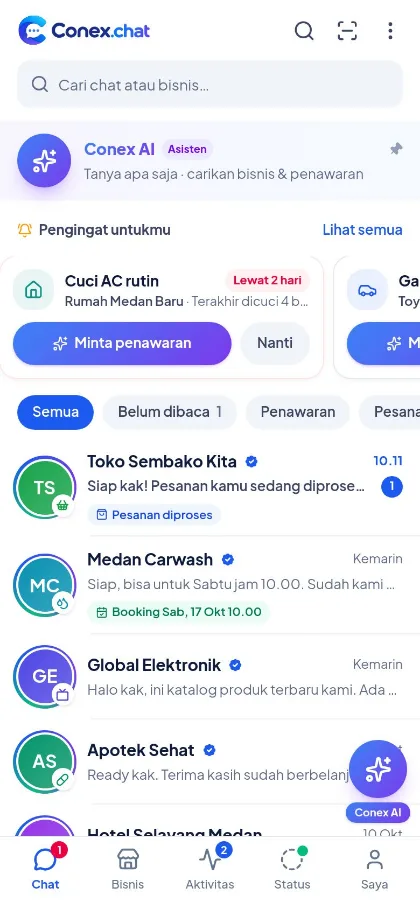
Conex connects you with businesses nearby through chat. Ask Conex AI, request quotes from several businesses at once, negotiate, order or book, then follow it through to completion, all from one app.
Benefits
One request reaches several businesses at once. No need to contact them one by one.
Quotes are written in chat and open to negotiation, so they're easy to compare.
Matched by category, location, and the service area of businesses near you.
Chats, quotes, orders, reviews, and asset history are kept in one place.
No subscription fee. You only pay for the goods or services you order.
Passwordless sign-in, a hidden number, block and report, plus complaints if something goes wrong.
All features
Pick a feature to see how it works in more detail.
Describe what you need; AI finds businesses and drafts your request.
Learn moreOne request to several businesses, then compare and negotiate.
Learn moreSend photos, videos, documents, and voice notes straight to the business.
Learn moreFind nearby businesses and products by category, city, and map.
Learn moreCart, checkout, appointments, reservations, and rescheduling.
Learn moreReal-time status, courier, proof of delivery, reviews, and complaints.
Learn moreSave your vehicles and belongings, and get maintenance reminders.
Learn moreBroken down or got a flat tire? Get help from the nearest business that's open.
Learn moreSign in with WhatsApp, hidden phone number, block & report.
Learn moreConex AI
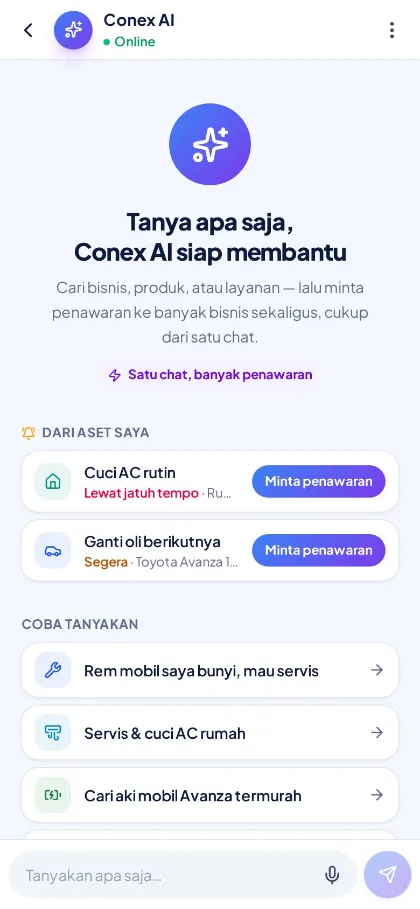
Write what you need in everyday language, like "car brakes squeaking", "home AC service", or "cheapest Avanza battery". Conex AI finds relevant businesses and products near you, then prepares a draft quote request.
Quote request draft
Illustration with sample data
Request a quote
Send one request to several matching businesses at once, up to 5. Quotes arrive in chat with full details and prices, so you can compare at your own pace.
Illustration with sample data
Chat with businesses
Ask about stock, send photos of the damage, or request a time slot directly with the business, without saving anyone's number. All your business chats live in one list.
Illustration with sample data
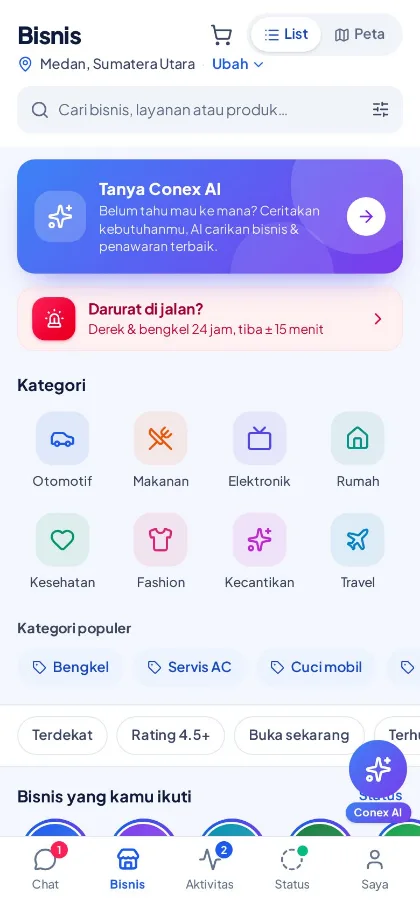
Explore
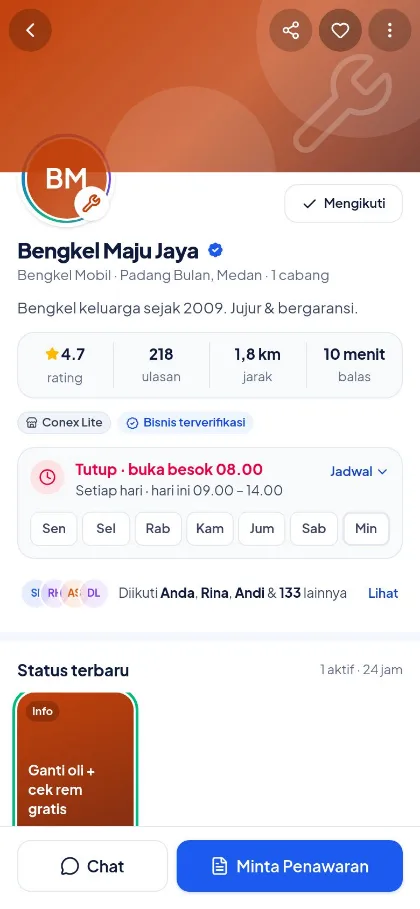
Browse businesses by category and city, search for services or products, or view them on a map. Open a profile to see opening hours, location, a catalog with variants, photo reviews, and the latest Status.
Order & book
Add products to your cart and check out, use vouchers from the business, and see the delivery fee upfront. For services, pick a staff member and an open time slot. For stays and rentals, pick dates on the calendar.
Choose staff
Sat, Oct 24
Illustration with sample data
Track orders
Every order has clear stages, from awaiting confirmation to completed. If the business delivers with its own courier via Conex Kurir, you can see the courier's location and proof of delivery.
Illustration with sample data
Use cases
A few examples of how people use Conex every day. Available businesses depend on your area.
Car brakes squeaking? Tell Conex AI, get quotes from several workshops nearby, pick a time, then keep the history in My Assets for your next service reminder.
AC not cooling or a leaky faucet? Send a request with photos and your address, compare prices from several technicians, negotiate, then choose who comes to your home.
Need a battery, spare parts, or everyday essentials? Search for the product, add it to your cart, use a store voucher, choose delivery or pickup, and track the courier.
Want a haircut or a treatment? Pick a staff member and an open time slot, then reschedule if something comes up, according to the rules shown before you book.
Find a place to stay or rent a vehicle, pick dates on the calendar, check the cancellation policy, then book and keep every conversation in one place.
Broken down or got a flat tire? Conex finds the nearest tow trucks and workshops that are open now, then sends a help request with your location to up to 3 businesses.
The full journey
Here's how a need gets taken care of on Conex, step by step.
Browse categories and the map, or tell Conex AI what you need.
Explore businesses & productsOne request with details, photos, and when you need it, sent to up to 5 matching businesses.
Request quotes & negotiateBusinesses reply with details and prices. Every quote has a validity period.
Request quotes & negotiatePropose a price or adjust items. An accepted quote automatically becomes an order.
Request quotes & negotiateFor fixed-price items: cart, voucher, delivery fee, then checkout. For services: pick a time slot.
Order & bookTrack each stage in real time, including the store courier's location and proof of delivery.
Track ordersConfirm receipt, leave a photo review, or file a complaint within 7 days if something goes wrong.
Track ordersSecurity & privacy
Sign in with just a WhatsApp code, no password. Your number isn't shown to businesses, and you stay in control of your data, devices, and notifications.
Illustration with sample data
More features
Save favorite businesses and products, plus pinned addresses, so your next order is faster.
Save vouchers from businesses or claim them with a code, then use them at checkout.
Mark an order as recurring and Conex reminds you to order again, without ordering automatically.
Get alerted when items are back in stock, prices drop, or a new business opens in your chosen category and city.
Choose notification categories and set quiet hours so you're not disturbed.
Choose a light or dark theme, or follow your system, and pick a comfortable text size.
See promos and the latest news from businesses you follow, then reply straight to chat.
Guides and support tickets right from the Saya (Me) menu.
Share Conex with friends and family via an invite link.
Good to know
Get started in 3 steps
From your phone or laptop, no download needed.
Enter your WhatsApp number and the verification code sent to it.
Search for businesses, or ask Conex AI directly.
Use it now
Open web.conex.chat in your phone's browser, then add it to your home screen so it feels like an app. The Android app is coming soon to Google Play.

 Web versionweb.conex.chat · ready to use
FAQ
No. Conex is free for users: find businesses, chat, request quotes, and order with no subscription fee. You only pay the business for the goods or services you order.
Open web.conex.chat, enter your WhatsApp number, then the verification code sent to your WhatsApp. No password needed.
No. Business profiles, catalogs, and category and city pages are open to everyone. You need an account to chat, request quotes, and order.
No. Conex AI finds matching businesses and prepares a draft quote request. The request is only sent after you review it and tap Kirim (Send).
Up to 5 matching businesses at once. Their quotes arrive in chat so you can compare, negotiate, and then accept or decline.
For now, payment is made in person: cash on delivery (COD), at pickup, or after the service is done. Online payment is on the way.
No. In chat, businesses only see your name and photo.
Yes, according to the cancellation policy and rescheduling rules shown before you order. Without a specific policy, you can cancel an order while it is still awaiting the business's confirmation.
File a complaint from the order page within 7 days of completion. The business responds within 48 hours, and the Conex team steps in to review if no agreement is reached.
Report it from the business profile or the chat menu, even before you transact. Reports are confidential and reviewed by the Conex team.
The Conex Android app is coming soon to Google Play. In the meantime, you can use Conex fully in your browser at web.conex.chat and add it to your phone's home screen.
Go to Saya (Me), then Privasi & keamanan (Privacy & security). There you can download your data and delete your account, with a grace period during which you can still cancel.
Open Conex now and describe what you need. Businesses nearby will make you offers.