

Follow-up & retention
Customers come back, because you remembered them
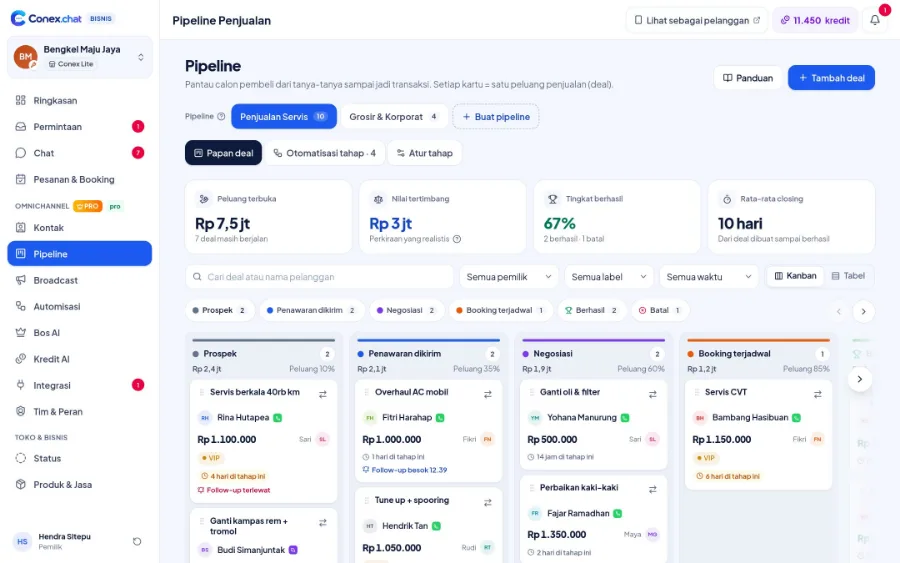
Follow-up reminders make sure no prospect is forgotten. After an order is completed, an automatic follow-up checks in with the customer, and recurring messages remind them of scheduled servicing or birthdays. In the Conex app, customers also get reminders from My Assets and recurring orders.
Illustration with sample data
Real challenges
What often happens without a system
One-time customers
Customers never come back after their first purchase.
Forgotten maintenance schedules
Customers forget their regular servicing until something goes wrong.
Inconsistent follow-ups
Follow-ups depend on each staff member's memory.
Before vs after
What changes with Conex Bisnis
Solutions
Mapped to Conex features
Follow-up reminders
Schedule follow-ups from inside the chat, with a notification when it's time.
OmnichannelAutomatic follow-ups
Triggered by a completed order, a label, or a deal stage (Pro).
Opt-in WhatsApp broadcasts & promosRecurring messages
Birthdays, scheduled servicing, repurchases, and holidays (Pro).
Opt-in WhatsApp broadcasts & promosReturning-customer vouchers
Discounts and vouchers for returning customers, loyal customers, followers, or specific labels.
Catalog & ordering optionsMy Assets on the customer side
Customers get maintenance reminders and can request a quote right away.
My Assets & remindersReviews & followers
Happy customers leave reviews and follow your business.
Get found by buyersSample flow
From the first chat to completion
Illustrated flow with sample data.
- 1
Order completed
- 2
An automatic follow-up asks about satisfaction (Pro)
- 3
The customer leaves a review and follows the business
- 4
A recurring message reminds them of their next service (Pro)
Get started in 15 minutes
Setup checklist
Real steps in the business.conex.chat dashboard.
- Register at business.conex.chat with your WhatsApp number, choose your business category, then fill in the name, address, and map pin.
- Open Integrasi › Kanal chat (Integrations › Chat channels), choose WhatsApp, then scan the QR code from your phone or enter the 8-letter code.
- Import your existing contacts from a CSV file in the Kontak (Contacts) menu, then label them.
- Create a discount or voucher in the Diskon & Promo (Discounts & Promos) menu and choose who it targets.
- Pro send "Minta persetujuan" (Request consent) to your contacts, then create your first broadcast in the Broadcast menu.
- Pro create automatic follow-ups for completed orders in the Broadcast menu.
Features by plan
What you get on Free and Pro
No quota numbers here; each plan's quota is shown in the Paket & Kuota (Plans & Quotas) menu.
Free No time limit
Pro Everything in Free, plus
Pro Rp149.000/month or Rp1.490.000/year. Compare plans
Good to know
- Mass sendingBroadcasts over a QR-linked WhatsApp number go out gradually, with pauses and a daily limit, to keep the number safe. For high volumes, the official WhatsApp API is coming soon.
- MembershipsThere's no membership or customer subscription feature yet. You can record member status using labels and custom contact fields.
FAQ
Customer follow-up & retention FAQ
What's the difference between automatic follow-ups and recurring messages?
Automatic follow-ups are triggered by an event, such as a completed order, and stop when the customer replies. Recurring messages are sent on a schedule, such as every birthday or every service interval.
Do these features require the Pro plan?
Automatic follow-ups and recurring messages are on Pro. Follow-up reminders in chat, vouchers, Status, and reviews are available on every plan.
Is there a points or membership program?
Not yet. Use targeted vouchers and customer labels.
Related solutions
See it from another angle
Marketing
Opt-in broadcasts, smart segments, Status, targeted vouchers.
See solution IndustriesAuto repair & automotive
Car & motorcycle workshops, car washes, towing, batteries & spare parts.
See solution IndustriesGyms & fitness
Trainer sessions & scheduled classes, with class schedules via Status.
See solution NeedsOpt-in WhatsApp broadcasts & promos
Opt-in, smart segments, scheduling, safe pacing, and reports.
See solutionTry Conex Bisnis for customer follow-up & retention
Register for free with your WhatsApp number, then follow the checklist above. Upgrade to Pro anytime.
