

Sales team
From chat to closing, all on record
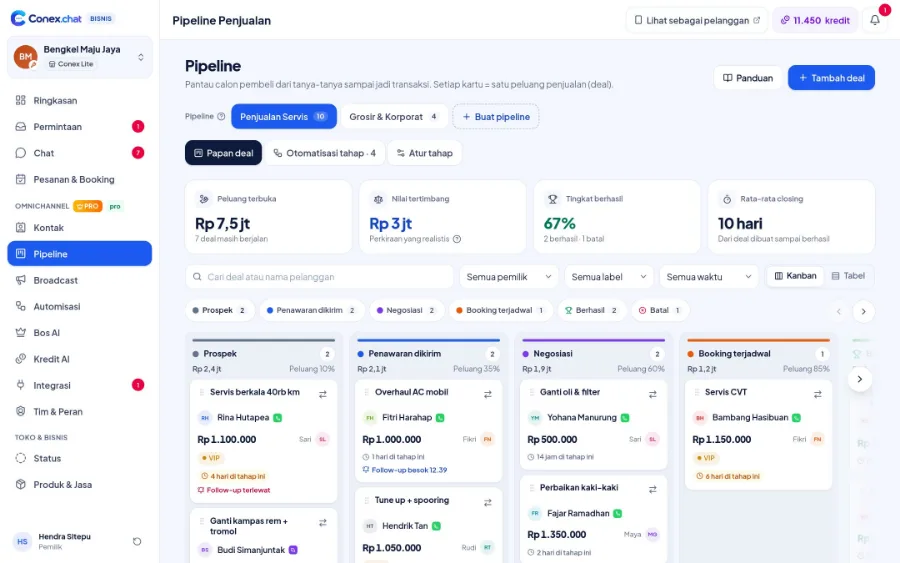
Every serious prospect becomes a deal straight from the chat. Deals move through the pipeline, stage automations send reminders and messages, and Bos AI gives you a prioritized follow-up list every day.
Illustration with sample data
Real challenges
What often happens without a system
Prospects in a separate spreadsheet
Prospect data isn't linked to the conversation.
Missed follow-ups
Buyers who already asked for a price are left to go cold.
Sales value you can't see
No overview of how much your open deals are worth.
Before vs after
What changes with Conex Bisnis
Solutions
Mapped to Conex features
Kanban & table pipeline
Presets for services, products, wholesale/B2B, pre-order, or start from scratch (Pro).
Leads, pipeline & B2B quotesStage automations
When a deal changes stage: add a label, hand it to a team member, set a reminder, or send a message (Pro).
Leads, pipeline & B2B quotesQuotes from deals
Send a quote to the chat, and the customer can accept it or make a counteroffer.
All the way to checkoutBos AI daily targets
Bos AI builds a prioritized follow-up list and flags stalled deals (Pro).
Answered by AIFollow-up reminders
Schedule follow-ups right from the chat.
OmnichannelContacts & segments
One contact across many channels, with segments and custom fields.
Team, contacts & broadcastsSample flow
From the first chat to completion
Illustrated flow with sample data.
- 1
A prospect asks a question in chat
- 2
Sales creates a deal and sends a quote
- 3
Stage automation sets a follow-up reminder
- 4
Bos AI flags stalled deals in the daily report
Get started in 15 minutes
Setup checklist
Real steps in the business.conex.chat dashboard.
- Register at business.conex.chat with your WhatsApp number, choose your business category, then fill in the name, address, and map pin.
- Open Integrasi › Kanal chat (Integrations › Chat channels), choose WhatsApp, then scan the QR code from your phone or enter the 8-letter code.
- Pro create a pipeline from a preset (services, products, wholesale/B2B, or pre-order) in the Pipeline menu.
- Import your existing contacts from a CSV file in the Kontak (Contacts) menu, then label them.
- Pro turn on Bos AI in the Bos AI menu with the "Saya setujui dulu" (I approve first) mode.
- Invite staff in the Tim & Peran (Team & Roles) menu, then share the invite link via WhatsApp.
Features by plan
What you get on Free and Pro
No quota numbers here; each plan's quota is shown in the Paket & Kuota (Plans & Quotas) menu.
Free No time limit
Pro Rp149.000/month or Rp1.490.000/year. Compare plans
Good to know
- Bos AI reportsBos AI's daily report arrives as a notification in the dashboard. Reports via WhatsApp aren't available yet.
- ChannelsOfficial WhatsApp API, Instagram DM, and Messenger are coming soon. For now, WhatsApp connects by scanning a QR code.
FAQ
Sales FAQ
Is the pipeline available on the Free plan?
No. Pipelines, stage automations, and Bos AI are on the Pro plan. Quotes and negotiation in chat are available on every plan.
Which pipeline presets are available?
Service sales, product sales, wholesale/B2B, pre-order, or start from scratch and set up your own stages.
Does Bos AI contact customers?
No. Bos AI only assesses, reminds, and suggests. Your sales reps are the ones who contact customers.
Related solutions
See it from another angle
Leads, pipeline & B2B quotes
Deals from chat, pipeline presets, stage automations, negotiations on record.
See solution IndustriesDistributors & wholesale (B2B)
Wholesale prices, negotiable quotes, B2B pipeline, and a sales team.
See solution IndustriesProperty
Prospects from chat are logged in the pipeline and assigned to the sales team.
See solution TeamsBusiness owners
Daily summaries, order reports, Bos AI, roles & permissions.
See solutionTry Conex Bisnis for sales
Register for free with your WhatsApp number, then follow the checklist above. Upgrade to Pro anytime.
