

AI bot
A bot that answers from your own knowledge
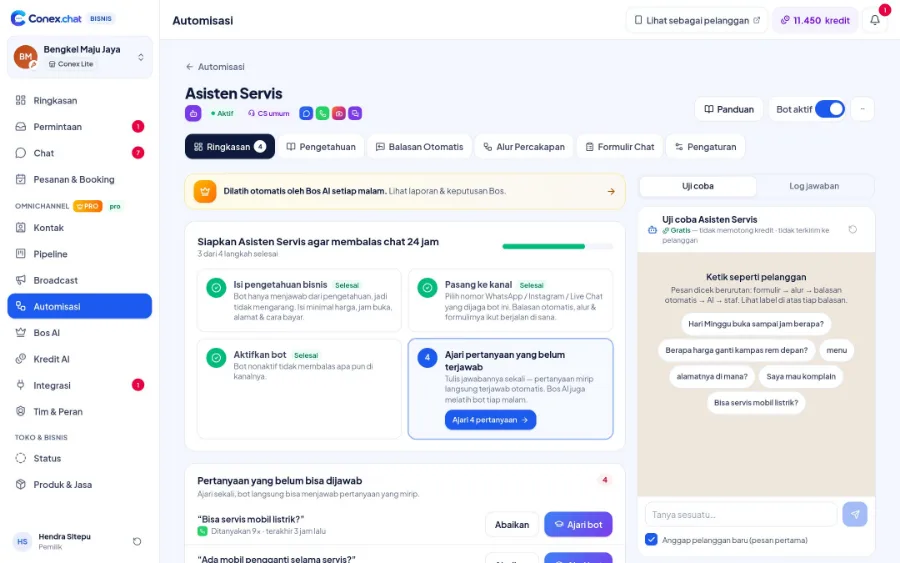
Every message is checked in order: greeting, menu, forms, conversation flows, keyword replies, then AI answers from your business knowledge. If it's still unsure, the chat is handed to staff. You can test the bot first and teach it from questions it couldn't answer.
- Plan
- FreePro
- In the dashboard
- Automisasi (Automation)
- Group
- AI & Automation
What it is
AI bot & knowledge
An automated assistant that answers customers on the channels you choose using the business knowledge you provide, and knows when to call in your staff.
Who it's for
- Businesses that get asked about prices, opening hours, and location all the time
- Owners who reply to chats themselves while serving customers in the store
- Businesses that get lots of chats after hours
- CS teams that want to focus on chats that need a human
What you get
AI bot & knowledge in Conex Bisnis
A clear order
Greeting, menu, forms, flows, keywords, AI answers, then handoff to staff.
Business knowledge
Basic info from your business profile, plus the FAQs and answers you write.
Test panel
Ask the bot questions like a customer before you turn it on. Testing doesn't use credits.
Unanswered questions
Questions the bot couldn't answer are collected. Teach it once, and similar questions get answered right away.
Choose which channels it covers
Conex Chat and WhatsApp on every plan, Telegram and Live Chat on Pro.
AI credits
AI answers use credits. When they run out, chats are passed to your staff.
Good to know
- PlanThe Free plan includes an AI bot with monthly AI credits. Conversation flows, chat forms, and more bots are on Pro.
- CreditsAI credit top-ups are requested from the dashboard and processed by the Conex team.
How it works
Step by step in the dashboard
Menu names match business.conex.chat (in Indonesian).
- 1
Create a bot
In Automisasi (Automation), choose the bot's purpose: general CS, bookings or orders, sales & price questions, or promos. The purpose sets a default persona and tone.
- 2
Add knowledge
In the Pengetahuan (Knowledge) tab, add Q&As, free text, PDF, Word, or TXT documents, and website links. Your profile and catalog data go into Pengetahuan Umum (General knowledge) too.
- 3
Choose channels & active hours
Pick the channels it covers and when the bot answers: 24 hours, only outside opening hours, or at set times.
- 4
Set up handoff to staff
Choose the triggers: keywords like "admin" or "komplain" (complaint), a customer who sounds upset, the bot being unsure, or a customer asking for a person.
- 5
Test it
Ask the bot questions in the test panel like a real customer. Testing doesn't use credits.
- 6
Turn it on & teach it
Switch the bot on, then answer the questions it couldn't so it can handle similar ones on its own next time.
Key settings
- Persona & tone
- Friendly, formal, or casual; short, medium, or detailed answers; with or without emoji.
- Guardrails
- Stop the bot from promising discounts, quoting prices outside the catalog, discussing competitors, or asking for PINs, OTPs, and passwords. You can write extra rules yourself.
- Pause after staff reply
- The bot stays quiet for the time you choose after a staff member joins the reply, from no pause up to 24 hours.
- Bot intelligence
- Hemat (Economy), Seimbang (Balanced), or Pintar (Smart). Pintar (Smart) suits complex questions and uses more AI credits.
- Memory & language
- How many recent messages it remembers, and the reply language: always Indonesian or matching the customer's language.
- Typing-like delay
- Replies are sent with a short, human-like delay: fast, normal, or relaxed.
Limits & rules
- Number of bots
- The Free plan includes one bot; the Pro plan allows more.
- One channel, one bot
- Each channel is covered by one bot so customers never get two replies.
- Channels
- Conex Chat and WhatsApp can be covered on every plan. Telegram and website Live Chat are Pro only.
- Knowledge documents
- Files up to 10 MB; scanned (image-only) PDFs can't be read. Websites are read up to 6 pages when deep reading is selected. Reading documents and websites uses AI credits; text you type doesn't.
- Out of credits
- The bot stops answering with AI and chats are handed to staff. Auto-replies, flows, and forms keep running.
Use cases
Used across many businesses
Workshops
The booking bot asks for the vehicle type and the problem, quotes service prices from the catalog, then hands over to staff when the customer asks for a final price.
Auto repair & automotive solutionCourses
The CS bot answers questions about class schedules, fees, and enrollment requirements from a PDF brochure uploaded to its knowledge.
Education & course solutionsOnline stores
The sales bot is only active outside opening hours, with guardrails against promising discounts or quoting prices outside the catalog.
Online store solutionIntegration with other features
Works together with other features
Problems it solves
This feature helps when…
Customers leave after business hours
Night-time questions get answered the next day, after the customer has already bought elsewhere.
See how to fix itChats pile up & replies are slow
Customers wait a long time because chats come in faster than you can reply.
See how to fix itCustomers keep asking the same things
Prices, location, and how to order are asked again and again, then answered by hand one by one.
See how to fix itNew admins take long to learn
New admins take a long time to learn the products, store rules, and how to reply to customers.
See how to fix itFAQ
AI bot & knowledge FAQ
Does the bot make up answers?
The bot answers from the knowledge you provide. When it isn't sure, it hands the chat to your staff.
What if AI isn't available?
The bot still runs greetings, menus, and keyword replies, then hands other questions to your staff.
How many bots can I create?
The Free plan includes one bot. The Pro plan lets you create more, for example a separate bot for each number.
When does the bot stop answering?
When a handoff trigger is met or a staff member joins the reply. Once a chat is handed off, the bot doesn't take over again until a new conversation starts, which is after 12 hours without messages.
What documents can I use as knowledge?
PDF, Word (.docx), and TXT files up to 10 MB, website links, and text you type yourself. Your business profile and catalog data are used too.
Does the bot know about price changes in the catalog right away?
Yes. Your catalog and business profile are part of Pengetahuan Umum (General knowledge) and are re-read regularly, so new prices are used without retyping them.
How many AI credits does each answer use?
Hemat (Economy) and Seimbang (Balanced) use 1 credit per answer, Pintar (Smart) uses 2. "Lengkap" (Detailed) answers use 1.5 times as much (rounded up), except on Hemat (Economy).
What name do customers see?
The bot's name is only visible to your team. Customers see your business name.
Related
Related features & solutions
AI Suggestions & Reply with AI
Reply drafts, reply with AI, and text polishing for staff.
Learn more FreeAuto-replies & business hours
Keywords, greetings, and away messages outside business hours, with no AI credits used.
Learn more ProConversation flows & forms
Guide customers step by step and collect details in the chat (Pro).
Learn more Needs24/7 auto-replies with AI
AI bot powered by your business knowledge, handing over to staff when unsure.
See solutionTry Conex Bisnis for free
Register with your WhatsApp number, fill in your profile, and start receiving chats today.
