

Multi-branch
Many branches, one dashboard
Add branches complete with address, map pin, opening hours, and closure dates. Set available products, delivery zones, and staff for each branch. Customers in the Conex app are routed to the nearest matching branch.
- Plan
- Free
- In the dashboard
- Profil Bisnis › Cabang (Business profile › Branches)
- Group
- Team & Operations
What it is
Multi-branch
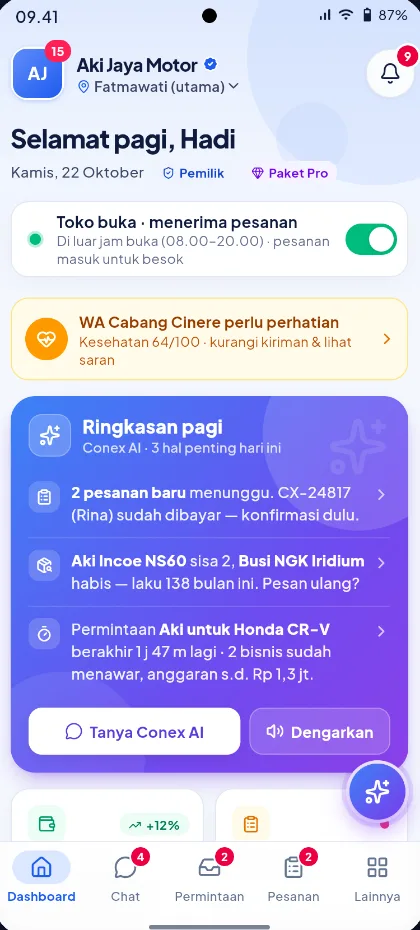
Multi-branch lets one business run several locations, each with its own address, hours, service area, available products, and staff, while everything is still managed from one dashboard and one inbox.
Who it's for
- Businesses with more than one store or outlet
- Chains of workshops, clinics, or salons across several locations
- Owners who want branch staff to see only their branch's data
- Owners of several different businesses who want to switch between them from one account
What you get
Multi-branch in Conex Bisnis
Location per branch
Address and map pin for each branch.
Hours & closure dates
Opening hours and temporary closures per branch.
Products per branch
Same catalog, availability per branch.
Delivery fees per branch
Delivery zones and rates for each branch.
Staff per branch
Staff and their positions at each branch, with access you can restrict.
Inactive & main branch
Temporarily deactivate a branch or change the main branch.
Good to know
- PricingSame prices across all branches.
- BotThe inbox bot answers using the main branch's data.
- TeamsInbox teams/divisions aren't tied to branches yet.
How it works
Step by step in the dashboard
Menu names match business.conex.chat (in Indonesian).
- 1
Add locations
Open Profil Bisnis › Cabang (Business profile › Branches), add a branch, then enter its address and drop its pin on the map.
- 2
Set hours & holidays
Enter opening hours for each day and that branch's special holidays. Branches without their own hours follow the business hours.
- 3
Define the service area
Set the service area and whether the branch accepts requests from Conex AI, then check the result with Uji pembagian Conex AI (Test Conex AI routing).
- 4
Choose products per location
In the Ketersediaan produk per lokasi (Product availability by location) grid, tick the products sold at each branch.
- 5
Assign staff
Assign team members to a branch along with their position: Branch head, Admin, Cashier, Technician, or Courier.
- 6
Restrict access if needed
The owner can turn on "Batasi akses staf per cabang" (Restrict staff access by branch) so staff only see their branch's chats, orders, bookings, and requests.
Key settings
- Main location
- One branch serves as the main location, and this role can be moved to another active branch.
- Branch status
- Active or Inactive. Inactive branches disappear from the public profile, search, map, and Conex AI matching, while ongoing orders are still processed.
- Branch-level access
- An owner-only switch. Owners and admins still see every location.
- Branch head permissions
- Branch heads can edit their own branch's info, hours, service area, and staff. The owner can turn this permission off.
- Delivery zones
- Rate zones based on radius from the branch or on city and district areas, set in the Kurir (Couriers) menu.
Limits & rules
- Main location
- The main location can't be deactivated or deleted until another branch is made the main one.
- Delete a branch
- A branch can only be deleted if it has no ongoing orders or bookings. Order history is kept.
- Pricing
- Product prices are the same across all branches. What you set per branch is availability.
- Special holidays
- A single special holiday can last up to 31 days. Branch holidays apply on top of business holidays.
- Bot & teams
- The inbox bot answers using the main branch's data, and inbox teams/divisions aren't tied to branches yet.
Use cases
Used across many businesses
Workshops
Three workshops with different opening hours. Booking capacity and technicians are set per location, and customers pick the nearest workshop when booking.
Auto repair & automotive solutionClinics
Each clinic has a branch head who manages practice hours and staff at that location, while the owner oversees every location.
Clinic & healthcare solutionsRetail shops
Items stocked only at the main store are marked as available at that one location, so customers at other branches don't order items that aren't there.
Shop & retail solutionIntegration with other features
Works together with other features
Problems it solves
This feature helps when…
FAQ
Questions about multi-branch
Is multi-branch a paid feature?
No. Multi-branch is a Business feature available on the Free plan.
How do customers choose a branch?
Customers choose a location when booking or checking out, and Conex AI in the customer app routes requests to the branch whose service area fits.
Can prices differ by branch?
Not yet. Prices are the same across all branches; what can differ is which products are available at each location.
What happens when a branch is deactivated?
The branch is no longer shown to new customers, but ongoing orders and bookings are still processed, and you can still edit the branch's details in the dashboard.
Can staff see only their own branch's data?
Yes. Once the owner turns on "Batasi akses staf per cabang" (Restrict staff access by branch), staff only see the chats, orders, bookings, requests, and deliveries of the branch they're assigned to.
Can I manage several different businesses?
Yes. From the business switcher in the dashboard, you can move between businesses or register a new one with the same account.
Can each branch have its own opening hours?
Yes, including branch-specific holidays. Branches without their own hours follow the business hours.
Related
Related features & solutions
Roles & permissions
Owner, Admin, Supervisor, staff, and custom roles (Pro).
Learn more FreeReports & summaries
Daily summaries, chats per channel, order reports with CSV.
Learn more FreeOrders & couriers
Orders and bookings in one list, plus your own trackable couriers.
Learn more Business sizeMulti-branch & franchise
Branches within one business, or several businesses under one account.
See solutionTry Conex Bisnis for free
Register with your WhatsApp number, fill in your profile, and start receiving chats today.
