

Answered by AI
Customers get fast answers, even when you're busy
The AI bot answers common questions from your business knowledge, such as prices, opening hours, address, and ordering options, on the channels it covers. When unsure, it hands the chat to staff. In the inbox, AI Suggestions drafts replies ready for you to send.
- Plan
- FreePro
- In the dashboard
- Automisasi (Automation) · Bos AI · Kredit AI (AI credits)
- Group
- AI & Automation
What it is
Answered by AI
AI-answered chat is a set of tools that keeps customer chats answered even when your team is busy: an AI bot covering the channels you choose, AI Suggestions drafting replies for staff, and Bos AI evaluating how the bot and team are doing.
Who it's for
- Businesses with busy chats at night or outside business hours.
- Owners who answer the same questions over and over every day.
- Customer service teams that want ready-to-use reply drafts instead of typing from scratch.
- Owners who want to know whether the bot and staff are serving customers well (Pro).
What you get
AI-answered chats in Conex Bisnis
Answers from your knowledge
The bot answers based on the business info, FAQs, and catalog you provide. If the answer isn't there, the bot doesn't make things up.
Keyword replies
Set fixed replies for keywords such as "location" or "opening hours". These replies don't use AI credits.
Handoff to a human
The bot hands the chat to staff when it isn't sure, when the customer asks, or according to rules you set.
Business hours
Choose when the bot is active, for example only outside business hours or when all staff are busy.
Test first
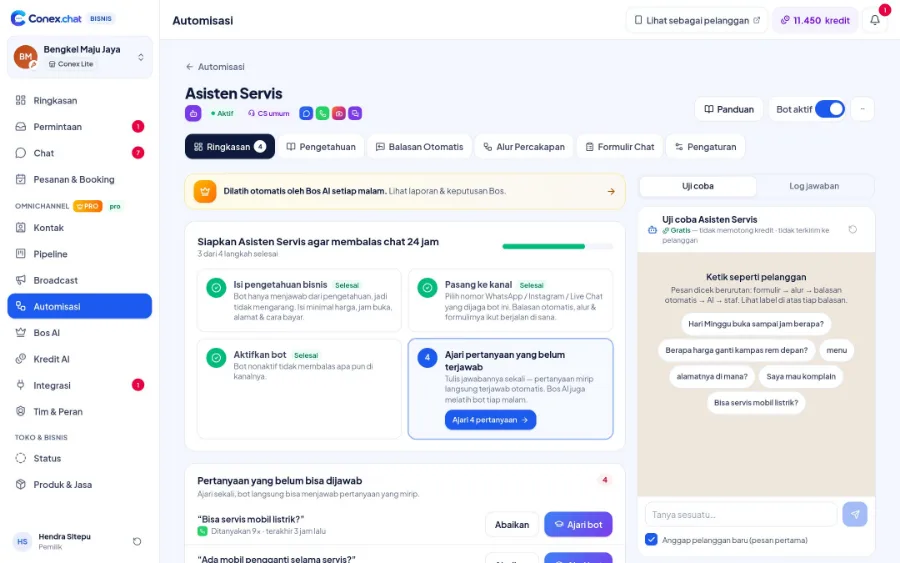
Ask the bot questions like a customer would in the test panel before going live. Testing doesn't use credits.
Learns from new questions
Questions the bot couldn't answer are collected. Teach it once, and similar questions are answered right away next time.
How AI credits work
AI replies use AI credits. Typically one bot reply or one AI Suggestion uses 1 credit. Every plan gets monthly credits. When credits run out, the bot stops and chats go to staff, so no chat is lost. Keyword replies keep running without credits.
How it works
Step by step in the dashboard
Menu names match business.conex.chat (in Indonesian).
- 1
Create a bot in Automisasi (Automation)
Choose the bot's goal, such as customer service, bookings, sales, or promos. Its persona and starting rules are set up to match that goal.
- 2
Add knowledge
Add Q&As, free text, website URLs, or PDF, Word, and TXT documents. Your business profile and Produk & Jasa (Products & Services) also feed its answers.
- 3
Test it like a customer
Ask questions in the test panel and refine the answers. Testing doesn't use AI credits.
- 4
Assign channels & set hours
Choose which channels the bot covers and when it's active: always, only outside business hours, or at specific times.
- 5
Set up handoff to staff
Choose keywords that call staff right away, such as "admin" or "complaint", and the message sent when a chat is handed over.
- 6
Monitor and teach
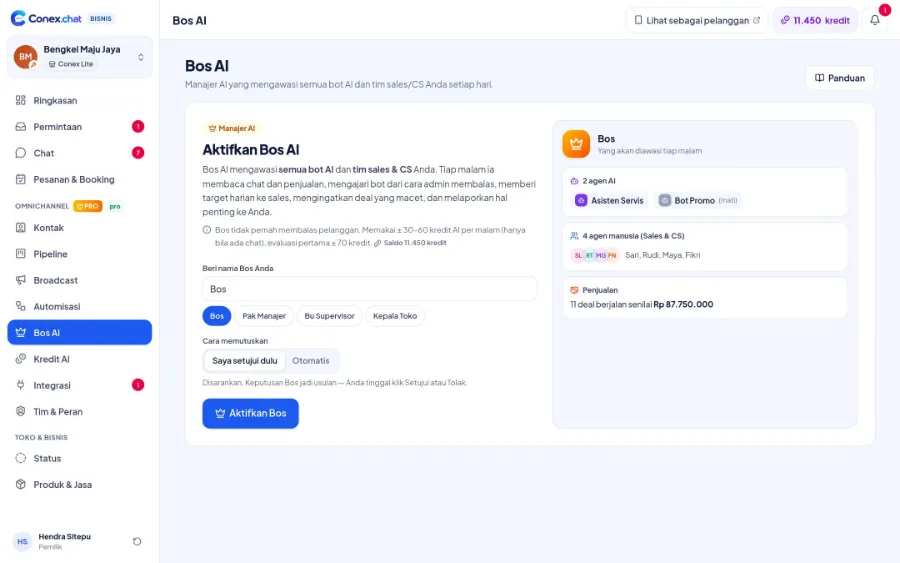
Unanswered questions are collected for you to teach. On the Pro plan, Bos AI reviews the bot every night.
Key settings
- Tone of voice
- Friendly, formal, or casual tone; short, medium, or detailed answers; with or without emoji.
- Answer limits
- No self-granted discounts, only discussing catalog products, not talking about competitors, and avoiding sensitive topics, plus up to 20 rules of your own.
- Automatic handoff
- The bot hands over the chat when the customer seems upset, when the bot isn't confident, or when the customer asks to talk to a person.
- Pause after staff reply
- The bot pauses after staff join in, 60 minutes by default, so it doesn't interrupt the conversation.
- Typing delay & language
- Replies are sent with a human-like typing delay (fast, normal, or relaxed), in Indonesian or in the customer's language.
- Intelligence mode
- Choose economical, balanced, or smart, depending on what the bot needs.
Limits & rules
- AI credits
- AI bot answers, AI Suggestions, and Reply with AI use AI credits. When credits run out, chats are handed to staff, while auto-replies, flows, and forms keep running without credits.
- Who can configure it
- Creating and editing bots, knowledge, and automations requires Admin-level permission. Regular staff can only view.
- Pro only
- Conversation flows, chat forms, and Bos AI are only available on the Pro plan. The number of bots on the Free plan is limited.
- Conversation sessions
- Once a chat is handed to staff, the bot won't join in again for that session. A new session starts after 12 hours without messages.
Feature details
Learn more in detail
AI bot & knowledge
How the bot answers: rule order, knowledge, testing, learning.
Learn more FreeAI Suggestions & Reply with AI
Reply drafts, reply with AI, and text polishing for staff.
Learn more ProBos AI
AI manager: reviews the bot & staff, daily targets, escalations, Ask the Boss.
Learn more FreeAuto-replies & business hours
Keywords, greetings, and away messages outside business hours, with no AI credits used.
Learn more ProConversation flows & forms
Guide customers step by step and collect details in the chat (Pro).
Learn moreBos AI: an AI manager for your bots and team
On the Pro plan, Bos AI reads chats and sales every night, evaluates how the bots and team performed, suggests lessons for the bots, and flags missed follow-ups. Bos AI never replies to customers. Its suggestions only take effect after you approve them.
Use cases
Used across many businesses
Clinics
The bot answers practice hours and how to register from the clinic's knowledge, then hands questions about symptoms to staff.
Clinic & healthcare solutionsRestaurants & cafés
Questions about the menu, opening hours, and location are answered by the bot at night, while the keyword "reservation" calls staff right away.
Restaurant & café solutionVehicle rental
The bot explains rental terms and the units in the catalog, then passes renters who are ready to book to an admin.
Car rental solutionsIntegration with other features
Works together with other features
Problems it solves
This feature helps when…
FAQ
Questions about the AI bot
Is the AI bot available on the Free plan?
Yes. The Free plan already includes the AI bot, AI Suggestions, and monthly AI credits. The Pro plan gives you more bots and credits, plus conversation flows, chat forms, and Bos AI.
Where does the bot get its answers?
From the knowledge you add: Q&As, text, websites, and PDF, Word, or TXT documents, plus your business profile and Produk & Jasa (Products & Services). If it can't find an answer, the bot hands the chat to staff.
Can the AI bot give wrong answers?
The bot answers from the knowledge you add and hands the chat to staff when it isn't sure. Test the bot in the test panel before going live, and teach it the questions it couldn't answer.
Will the bot interrupt while staff are replying?
No. Once staff join in, the bot pauses, for 60 minutes by default. Chats that have been handed to staff also won't be answered by the bot again in the same session.
Can the bot reply in the customer's language?
Yes. Choose Indonesian for all replies, or set the bot to follow the language the customer uses.
Can the bot give discounts on its own?
Not by default. The bot is not allowed to promise discounts and only discusses products in your catalog. You can change these limits in the bot settings.
What if my AI credits run out?
The bot stops replying and chats are passed to staff, so no chat is lost. Keyword replies keep working. To add credits, send a request from the dashboard.
Does Bos AI reply to customer chats?
No. Bos AI only reads, evaluates, and suggests. Replies to customers are still sent by the bot you configure or by your team.
Related
Related features & solutions
Omnichannel
Conex Chat, WhatsApp, Telegram & website Live Chat in one inbox.
Learn more FreeAll the way to checkout
Quotes, negotiation, cart, all the way to orders, all inside the chat.
Learn more FreeProTeam, contacts & broadcasts
Staff & roles, customer contacts, pipeline, and opt-in broadcasts.
Learn more Needs24/7 auto-replies with AI
AI bot powered by your business knowledge, handing over to staff when unsure.
See solutionTry Conex Bisnis for free
Register with your WhatsApp number, fill in your profile, and start receiving chats today.
