

Followers
Turn one-time buyers into loyal followers
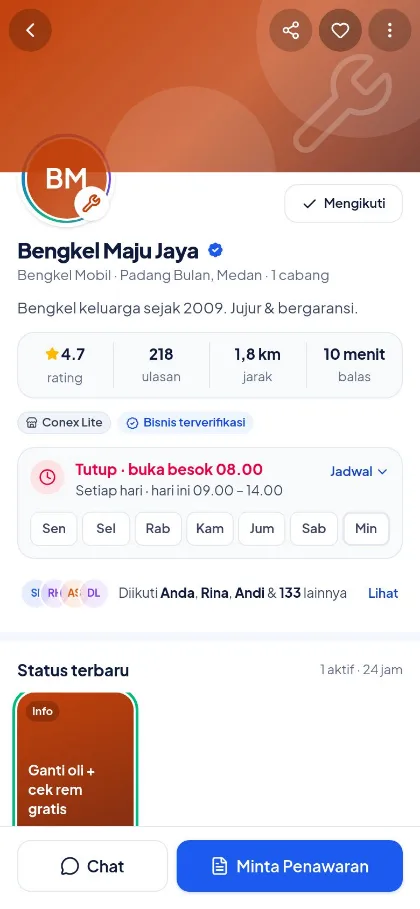
Customers who tap Follow on your profile see your latest Status posts and promos. Share your profile link and business QR code to make following easy, then get to know your followers in the Pengikut (Followers) menu.
- Plan
- Free
- In the dashboard
- Pengikut (Followers) · Profil Bisnis (Business profile)
What it is
Followers, links & QR
A way to build your own audience on Conex: people interested in your business follow you and can be reached without mass messaging.
Who it's for
- Cafes, salons, and stores with walk-in customers.
- Businesses that regularly share promos or new menu items.
- Owners who want to know which customers are already loyal.
What you get
Followers, links & QR codes in Conex Bisnis
Follower list
See who follows you, search, and sort by newest or most transactions.
Filter followers
All, has transacted, or newly followed in the last 7 days.
Vouchers & discounts
Send vouchers via chat or create follower-only automatic discounts in Diskon & Promo (Discounts & Promos).
Status for followers
Your 24-hour Status appears in your followers' Status tab.
Profile link
A conex.chat/b/business-name address you can copy and change.
Business QR code
A QR code with your profile link, from the Bagikan (Share) menu on your business profile in the Conex app.
Good to know
- PrivacyFollower areas, follow sources, and customers' notification settings aren't shared with businesses.
- VouchersVouchers are sent via chat, so they can only go to followers who have contacted you before.
How it works
Step by step in the dashboard
Menu names match business.conex.chat (in Indonesian).
- 1
Set your profile address
In Profil Bisnis › Alamat profil publik (Business profile › Public profile address), copy the link or change the address.
- 2
Display the QR code
Open your profile in the Conex app › Bagikan (Share) › QR bisnis (Business QR), then print it or display it in store.
- 3
Track followers
Open the Pengikut (Followers) menu to see the count, search, and filter followers.
- 4
Reach out to followers
Tap Chat or Voucher on a follower's row, or post a Status for all followers.
- 5
Offer a special discount
In Diskon & Promo (Discounts & Promos), create an automatic discount targeting followers.
Key settings
- Profile address
- Change the address; the old one keeps pointing to the new one.
- Sorting & filters
- Sort and filter the follower list however you need.
- Follower discounts
- Target automatic discounts at followers only in Diskon & Promo (Discounts & Promos).
Limits & rules
- Private customer data
- Followers' areas, sources, and notification settings aren't shown.
- Vouchers via chat
- Only for followers who have started a chat before.
- One item discount
- Automatic discounts don't stack; the system picks the one that saves the customer the most.
Use cases
Used across many businesses
Restaurants & cafés
A business QR code sits on the cashier counter. Followers see a Status with the new menu every morning.
Restaurant & café solutionSalon
A salon sends vouchers to followers who've transacted before to invite them back.
Salon & barbershop solutionsRetail shops
A store offers a follower-only automatic discount so new buyers are keen to tap Follow.
Shop & retail solutionIntegration with other features
Works together with other features
Problems it solves
This feature helps when…
Past customers don't come back
Customers buy once and then disappear, and no one invites them back.
See how to fix itHard to find on Google
People nearby don't know your business exists.
See how to fix itPromos don't land or the number gets restricted
Promos go unread, or the number gets restricted for mass messaging.
See how to fix itFAQ
Questions about followers, links & QR codes
How do customers become followers?
By tapping Ikuti (Follow) on your business profile in the Conex app. Invite them to follow once a transaction is complete.
Where do I get my business QR code?
Open your business profile in the Conex app, tap Bagikan (Share), then choose QR bisnis (Business QR). The QR code links to your business profile and chat.
Can I change my profile address?
Yes, in Profil Bisnis (Business profile). Addresses use 3–60 characters of lowercase letters, numbers, and hyphens. The old address keeps redirecting to the new one.
What do customers get from following?
Followers see your latest Status posts and promos, and can get discounts you reserve for followers.
Can I see where followers came from?
Not yet. Follow sources aren't recorded, and customers' areas and notification settings aren't shared, to protect their privacy.
Is this a paid feature?
No. Followers, profile links, and business QR codes are available on the Free plan.
Related
Related features & solutions
Business Status
24-hour posts for followers, with action buttons and AI writing.
Learn more FreeVouchers, discounts & promos
Targeted vouchers, automatic discounts, and purchase promos.
Learn more FreeGet found by buyers
Free profile & catalog on Conex and Google, plus Conex AI recommendations.
Learn more NeedsCustomer follow-up & retention
Reminders, automatic follow-ups, recurring messages, vouchers for returning customers.
See solutionTry Conex Bisnis for free
Register with your WhatsApp number, fill in your profile, and start receiving chats today.
