Chat with businesses
Chat directly, no numbers to save
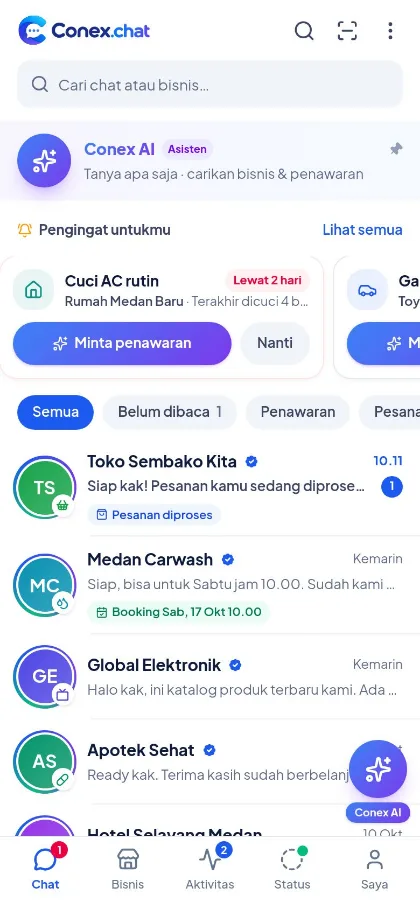
Ask about stock, send photos of the damage, or request a time slot directly with the business. All your business chats live in one list, complete with quotes and order updates. Your WhatsApp number is never shown to businesses.
- Free for users
- Sign in with your WhatsApp number
Illustration with sample data
What you can do
Chatting with businesses on Conex
Photos, videos & documents
Send photos or videos from your gallery or camera, plus PDF documents.
Voice messages
Record a voice message when typing feels like a chore.
Reply, copy & unsend
Reply to a specific message, copy text, or unsend a message you've already sent.
Search in chat
Find a price or address you were sent before, just by searching for a keyword.
Quotes & orders in chat
Quote, order, request, and asset cards appear right in the conversation.
Organize your chats
Mute (8 hours, 1 week, or always), pin, archive, or label your chats.
How to use it
Get started in 3 steps
Find a business
Via search, categories, Conex AI, or a business profile link.
Tap Chat
The conversation opens right away, no number to save.
Send & get updates
Get replies in real time, with read receipts and browser notifications.
FAQ
Questions about chatting with businesses
Can businesses see my WhatsApp number?
No. In chat, businesses only see your name and photo. Your number is never shown.
How big can the files I send be?
Photos up to 10 MB, videos up to 50 MB, voice messages up to 10 MB, and PDF documents up to 20 MB.
What if a business is bothering me?
You can mute the chat, block the business, or report it confidentially from the chat menu.
Can I delete a chat?
Yes. Deleting a chat hides it from your list. You can also unsend messages you've already sent.
Related features
Pair it with other features
Try Conex now
Free for users. Sign in with your WhatsApp number and tell us what you need.