

Distributors & wholesale
Bulk orders, quotes on record
Wholesale buyers add items to their cart, and large purchases automatically become quote requests. You reply with special pricing, every negotiation version is recorded, and each prospect is tracked in the Wholesale/B2B pipeline.
Listed in the Conex app under your product category. Business features start with a basic set that you can add to.
- Distributors
- Wholesale agents
- Store suppliers
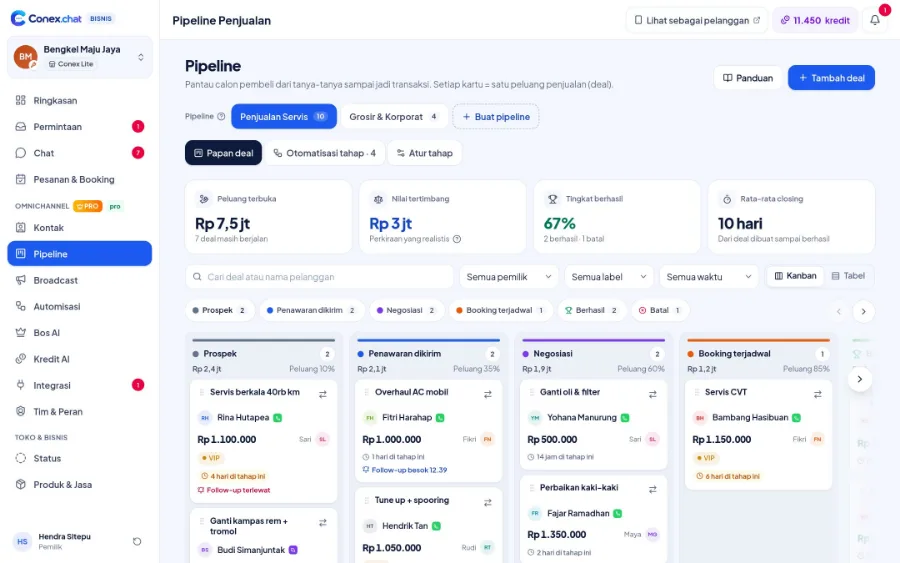
Illustration with sample data
Real challenges
What often happens without a system
Special prices recalculated every time
Every big buyer asks for a different price.
Negotiations aren't recorded
Price agreements get lost in long chat threads.
Buyers spread across many sales reps
No overview of which buyer is being negotiated by whom.
Before vs after
What changes with Conex Bisnis
Solutions
Mapped to Conex features
Wholesale pricing from the cart
Bulk purchases automatically become wholesale quote requests.
All the way to checkoutQuotes & negotiation
Change quantities and items through negotiation, with every version saved.
All the way to checkoutWholesale/B2B pipeline
Preset stages for wholesale sales, complete with deal values (Pro).
Leads, pipeline & B2B quotesKasirXpert sync
Products and stock stay in sync with your POS app.
IntegrationsSales team
Assign chats to sales reps and set permissions for each role (Pro).
SalesOpt-in price lists
Send pricing info to customers who have opted in to messages (Pro).
Opt-in WhatsApp broadcasts & promosFrom the customer's side
How customers find you and order
Your business shows up in the Conex app, where people search, ask, and order through chat.
Sample flow
From the first chat to completion
Illustrated flow with sample data.
- 1
A business buyer fills the cart with a large quantity
- 2
The purchase turns into a wholesale quote request
- 3
Sales sends a quote, and every negotiation version is recorded
- 4
The accepted deal becomes an order and is logged in the pipeline
Get started in 15 minutes
Setup checklist
Real steps in the business.conex.chat dashboard.
- Register at business.conex.chat with your WhatsApp number, choose your business category, then fill in the name, address, and map pin.
- Connect KasirXpert or Halobengkel in Integrasi › Sistem bisnis (Integrations › Business systems), or import products from CSV.
- Turn on Harga grosir (Wholesale pricing) in Fitur Bisnis (Business features) so bulk purchases become quote requests.
- Pro create a pipeline from a preset (services, products, wholesale/B2B, or pre-order) in the Pipeline menu.
- Invite staff in the Tim & Peran (Team & Roles) menu, then share the invite link via WhatsApp.
- Pro send "Minta persetujuan" (Request consent) to your contacts, then create your first broadcast in the Broadcast menu.
Features by plan
What you get on Free and Pro
No quota numbers here; each plan's quota is shown in the Paket & Kuota (Plans & Quotas) menu.
Free No time limit
- Conex Chat & WhatsApp inbox
- WhatsApp via QR scan (up to 2 numbers on Free)
- Product & service catalog with variants
- Stock & variants
- Wholesale pricing from the cart
- Quotes & negotiation in chat
- Store couriers & delivery fees by zone
- Customer contacts, segments & custom fields
- KasirXpert & Halobengkel integration, CSV import
Pro Rp149.000/month or Rp1.490.000/year. Compare plans
Good to know
- PaymentFor now, payment is made in person. Online payment (QRIS, virtual accounts, e-wallets) is coming soon for verified businesses.
- ShippingThere's no third-party carrier integration or automatic tracking numbers yet. Deliveries use your store's own couriers, or fees and tracking numbers are shared via chat.
- Payment termsThere's no payment terms or installment feature yet. Payment terms are agreed in chat.
FAQ
Distributor & wholesale FAQ
When does a cart become a wholesale price request?
When the purchase has 10 or more items, or 2 or more items with a total of at least Rp5 million. The buyer then submits a quote request from the cart.
Can I set special prices per customer?
There are no customer-specific price lists yet. Special prices are sent to each buyer through a quote.
Are payment terms available?
Not yet. Payment terms are agreed in chat, and online payment is coming soon for verified businesses.
Related solutions
See it from another angle
Leads, pipeline & B2B quotes
Deals from chat, pipeline presets, stage automations, negotiations on record.
See solution TeamsSales
Pipeline, quotes, stage automations, and Bos AI daily targets.
See solution IndustriesShops & retail
Groceries, electronics, batteries & spare parts: cart, stock, wholesale, couriers.
See solution NeedsPOS & system integrations
KasirXpert, Halobengkel, CSV, Business API & webhooks.
See solutionTry Conex Bisnis for distribution & wholesale (B2B)
Register for free with your WhatsApp number, then follow the checklist above. Upgrade to Pro anytime.
