

Pipeline
Every opportunity, every stage in view
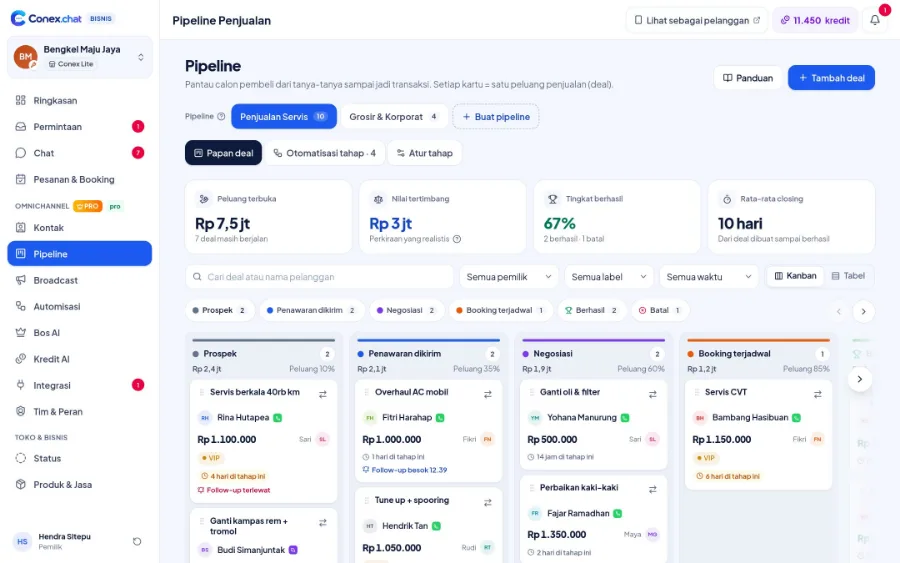
Turn serious conversations into deals right from the customer profile panel. Deals move through a kanban or table pipeline, and when they change stage, automations can add a label, assign a member, set a reminder, or send a message.
- Plan
- Pro
- In the dashboard
- Pipeline
What it is
Sales pipeline
The pipeline is a board of sales opportunities. Every serious prospect is recorded as a deal with an estimated value, then moved from stage to stage until it's won or lost.
Who it's for
- Sales teams following up on high-value quotes
- Service businesses that schedule visits once a quote is accepted
- Distributors serving wholesale and corporate buyers
- Owners who want a revenue forecast from deals in progress
What you get
Sales pipeline in Conex Bisnis
Stage presets
Service sales, product sales, wholesale/B2B, pre-order, or blank.
Deals from chat
Create a deal from the profile panel beside the conversation.
Stage automations
Add a label, assign a member, set a reminder, or send a message, including the day before closing.
Deal value
See the total value at each stage.
Kanban & table
Choose whichever view works best for you.
Send quotes
Quotes from a deal are sent to the customer's chat.
Good to know
- PresetsThere are no presets for property or education yet. Start from a blank pipeline.
How it works
Step by step in the dashboard
Menu names match business.conex.chat (in Indonesian).
- 1
Create a pipeline from a preset
Open the Pipeline menu, then choose Penjualan jasa (Service sales), Penjualan produk (Product sales), Grosir / B2B (Wholesale / B2B), Pre-order, or Mulai dari kosong (Start from blank). Each preset comes with stages and starter automation rules.
- 2
Log deals from chat
In the Chat menu, open the customer profile panel and tap Buat deal (Create deal). Enter a title, an estimated value, and the starting stage.
- 3
Move deals between stages
In the Papan deal (Deal board) tab, drag the card to the next column, or use the "Pindah ke…" (Move to…) menu from your phone or keyboard.
- 4
Set up stage automations
In the Otomatisasi tahap (Stage automations) tab, decide what happens when a deal enters a stage: add a label, assign a member, set a reminder, or send a message.
- 5
Close the deal
Move it to the Berhasil (Won) stage with its final value, or to Batal (Lost) with a reason: too expensive, changed their mind, went elsewhere, or your own reason.
- 6
Review in Tabel (Table) view
Sort deals by value or date, filter by status, then export to CSV if needed.
Key settings
- Stages & probability
- In the Atur tahap (Edit stages) tab: name, color, order, and win probability for each stage. The probability is used to calculate a deal's weighted value.
- Automation rules
- Actions per stage: add a label, assign to the member with the fewest open deals, a reminder a set number of hours later, or a message right away or the day before the expected close date.
- Expected close date
- Each deal's expected close date, used for messages scheduled the day before.
- Owner, labels & notes
- Every deal has its own owner on the team, labels, and notes.
Limits & rules
- Pro plan
- The Pipeline menu is available on the Pro plan.
- Stage setup
- Each pipeline has 1–10 open stages, plus exactly one Berhasil (Won) stage and one Batal (Lost) stage.
- Limits
- Up to 20 pipelines per business and 30 automation rules per pipeline.
- Deleting a stage
- Deals in a deleted stage are moved to a stage you choose, and at least one pipeline must remain.
- Permissions
- Viewing and editing pipelines follows each member's role permissions.
Use cases
Used across many businesses
Workshops
A major service inquiry is logged in the Tanya-tanya (Inquiry) stage, a quote is sent from the deal, then a reminder goes out the day before the scheduled visit.
Auto repair & automotive solutionDistributors
Store buyers are tracked with the Grosir / B2B (Wholesale / B2B) preset from first contact until the PO is received, and deals that reach the proposal stage are automatically assigned to the sales team.
Distributor & wholesale (B2B) solutionProperty
Prospective tenants are tracked in a pipeline built from scratch, for example Survei (Viewing), Negosiasi (Negotiation), and Tanda jadi (Deposit), with a lost reason for every deal that falls through.
Property solutionsIntegration with other features
Works together with other features
Problems it solves
This feature helps when…
Forgetting to follow up with prospects
Interested buyers never get contacted again.
See how to fix itNo visibility into team performance
The owner can't tell who is slow to reply or which deals are stuck.
See how to fix itMessy price quotes
Prices are recalculated every time, quote formats vary, and negotiations are scattered across chats.
See how to fix itBusy chats, unclear sales
Lots of chats come in, but it's unclear which turn into sales and which go nowhere.
See how to fix itWholesale orders are slow to process
Wholesale and B2B requests get lost, special prices are calculated by hand, and follow-ups are slow.
See how to fix itFAQ
Sales pipeline FAQ
Is the pipeline available on the Free plan?
No. Pipeline is part of the Pro plan. On the Free plan, you can tag prospects with labels and follow-up reminders in the inbox.
What's a weighted value?
A deal's value multiplied by its stage's win probability. A deal in a stage with a 60% probability counts as 60% of its value, giving you a more realistic revenue forecast.
Can I have several pipelines?
Yes, up to 20 pipelines per business, for example one for services and one for wholesale buyers.
What's recorded when a deal is lost?
The reason it was lost: too expensive, changed their mind, went elsewhere, or a reason you write yourself. These notes help you see why deals fall through.
Which channel do automatic pipeline messages go through?
To the customer's chat on the conversation's channel, including connected WhatsApp. Messages can go out right away or be scheduled for the day before the expected close date.
Can deal data be exported?
Yes. The Tabel (Table) view offers CSV export.
Are deals connected to chats?
Yes. Deals are created from the profile panel beside the conversation, and quotes from a deal can be sent straight to the customer's chat.
Related
Related features & solutions
Contacts & segments
One contact across many channels, segments, custom fields, duplicate merging, CSV.
Learn more ProBos AI
AI manager: reviews the bot & staff, daily targets, escalations, Ask the Boss.
Learn more FreeProTeam, contacts & broadcasts
Staff & roles, customer contacts, pipeline, and opt-in broadcasts.
Learn more NeedsLeads, pipeline & B2B quotes
Deals from chat, pipeline presets, stage automations, negotiations on record.
See solutionTry Conex Bisnis for free
Register with your WhatsApp number, fill in your profile, and start receiving chats today.
