

Get found by buyers
Get found by new buyers, at no listing cost
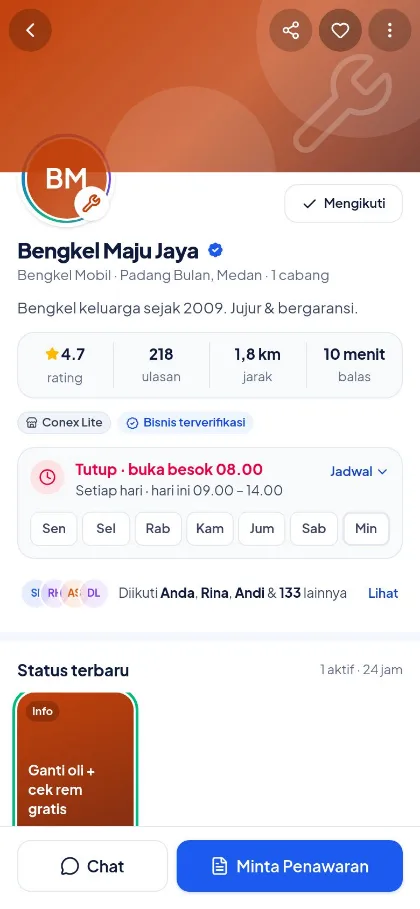
Once you sign up, your business profile appears in the Conex app complete with catalog, opening hours, location, and reviews. Profile pages are built to be easy to find on Google, and Conex AI matches buyers' needs with the right businesses.
- Plan
- Free
- In the dashboard
- Profil Bisnis (Business profile) · Verifikasi (Verification) · Status
What it is
Get found by buyers
Being listed on Conex means your business has a public profile and catalog page on conex.chat that anyone can open, find via Google, and get matched by Conex AI with people who are searching.
Who it's for
- Local businesses that don't have their own website yet.
- Workshops, salons, or home services that want to be known in the neighborhood.
- Owners who want to receive quote requests from new buyers.
- Businesses with several branches that need to show up based on each location.
What you get
Get found by buyers with Conex Bisnis
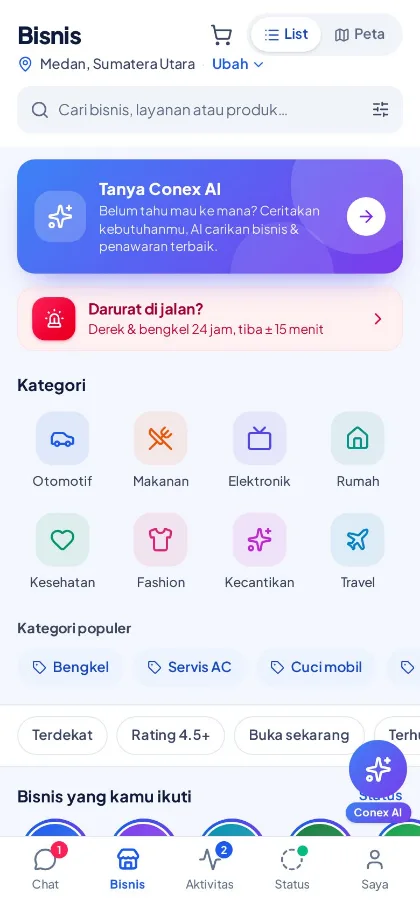
Public business profile
The conex.chat/b/business-name page shows your category, location, opening hours, reviews, and Chat and Request a quote buttons.
Found on Google
Profile and product pages are built to be easy for search engines to read, including category and city pages.
Recommended by Conex AI
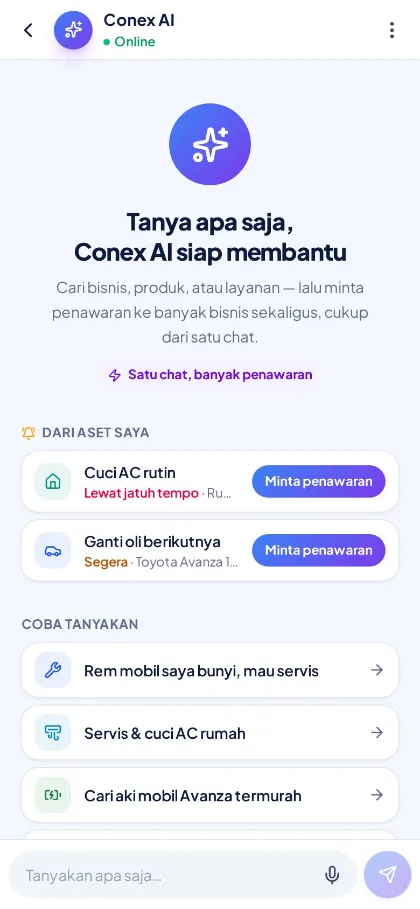
Buyers just write what they need. Conex AI finds matching businesses based on category, location, and service area.
Quote requests come in
Buyer requests arrive in the Permintaan (Requests) menu. Reply with a price quote from the dashboard or your phone.
Branches & service area
Set your store location, branches, and service area, either as a radius or by city or district.
Followers & Status
Buyers can follow your business. Share promos or news in a Status that stays up for 24 hours.
How it works
Step by step in the dashboard
Menu names match business.conex.chat (in Indonesian).
- 1
Complete your Profil Bisnis (Business profile)
Fill in your name, category, description, photos, address, and store location pin. Your conex.chat/b/business-name page goes live right away.
- 2
Set opening hours & holidays
Set opening hours for each day and special closure dates so your "open now" status is always accurate.
- 3
Define your service area
Choose a radius from your store or a list of areas you serve. Conex AI uses this area when matching buyer requests.
- 4
Fill in Produk & Jasa (Products & Services)
Every product gets its own page under your profile, complete with photos, price, and description.
- 5
Apply for verification
Submit the owner's identity details and business details in the Verifikasi (Verification) menu to get a verified badge.
- 6
Keep your profile active
Reply to chats and requests, collect reviews, and share Status updates with your followers.
Key settings
- Categories
- Determines which category pages your business appears on and which requests Conex AI matches to you.
- Service area
- A 0.1–100 km radius from your store or branch, or a list of provinces, cities, and districts you serve.
- Opening hours
- Up to four time ranges per day, open 24 hours, closed all day, or past midnight, in WIB, WITA, or WIT time zones.
- Special holidays
- Mark closure dates, such as public holidays, with a short note for customers.
Limits & rules
- Google ranking
- Pages are built to be easy for search engines to read, but search result rankings are set by Google and can't be guaranteed.
- City & category pages
- City or category pages with only a few businesses aren't submitted to search engines until they have enough content.
- Requests from Conex AI
- Each buyer request goes to at most 5 matching businesses, and only if the buyer's location is within your service area.
- Special holidays
- Each holiday period can last up to 31 days.
Feature details
Learn more in detail
How does Conex AI choose businesses?
Buyers write what they need in everyday language, like "car brakes squeaking" or "home AC service". Conex AI finds relevant businesses and products, then drafts a quote request. The buyer decides whether to send it. One request can go to several matching businesses at once, up to 5.
Use cases
Used across many businesses
Home services
An AC service business sets its service area by district, so the requests it gets only come from areas it can actually reach.
Home services solutionsSalons & beauty
A salon shows its services, opening hours, and reviews on its profile, and prospective customers chat right away to ask about availability.
Salon & barbershop solutionsRetail shops
A building supply store appears on its city's category page and receives price requests from nearby buyers.
Shop & retail solutionIntegration with other features
Works together with other features
Problems it solves
This feature helps when…
FAQ
Questions about getting listed on Conex
How much does it cost to be listed on Conex?
It's free. Your business profile, catalog, chats with buyers, quote requests, and orders come with no subscription fee.
How do buyers find my business?
Through search and categories in the Conex app, profile and product pages that can be found on Google, category and city pages, and Conex AI, which matches buyers' needs by category, location, and service area.
Does every product get its own page?
Yes. Every product or service has a page under your business profile, so it can be found and shared directly.
How do I limit my service area?
Set your service area in Profil Bisnis (Business profile): a radius from your store, or a list of provinces, cities, and districts. Requests from Conex AI are only forwarded if the buyer's location falls within that area.
Can I add branches?
Yes. Add branches in Profil Bisnis (Business profile) with their locations, then choose which products are available at each branch.
What is business verification for?
Verifying the owner's identity and the business adds a verified badge to your profile. Verification is also required to accept online payments once that feature is live.
Will my business definitely show up on Google's first page?
No one can guarantee that. Conex prepares clean, search-engine-friendly pages, and a complete, active profile helps, but the ranking is up to Google.
Related
Related features & solutions
Catalog & ordering options
Products, services, variants, and promos with ordering options that fit your business type.
Learn more FreeAll the way to checkout
Quotes, negotiation, cart, all the way to orders, all inside the chat.
Learn more FreeProOmnichannel
Conex Chat, WhatsApp, Telegram & website Live Chat in one inbox.
Learn more NeedsShow up on Google & Conex (local SEO)
Profile & products indexed by Google, category & city pages, Conex AI.
See solutionTry Conex Bisnis for free
Register with your WhatsApp number, fill in your profile, and start receiving chats today.
