

Contact
One customer, one complete record
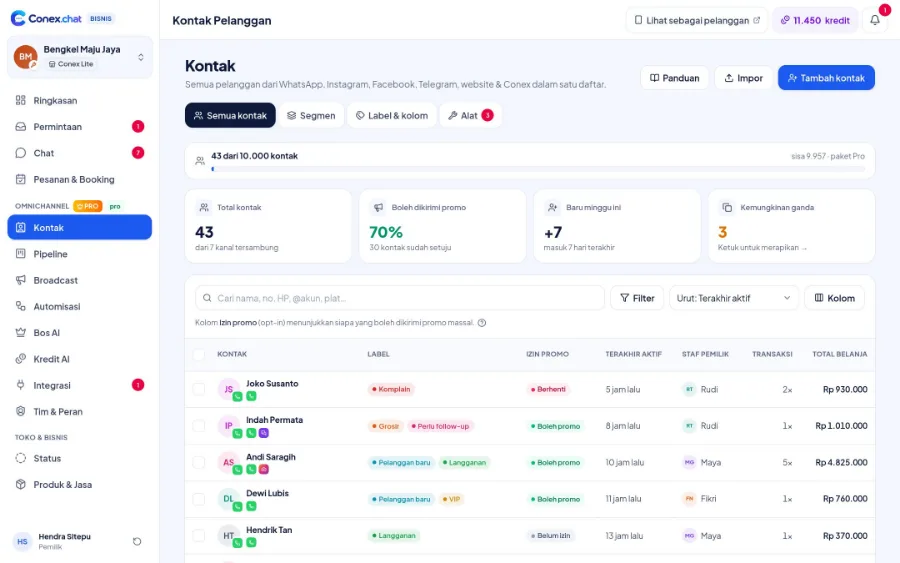
Contacts from chats are saved automatically, and the same customer on WhatsApp, Telegram, and Conex is merged into one contact. Add labels and custom fields, build segments, merge duplicates, then import or export via CSV.
- Plan
- Free
- In the dashboard
- Contact
What it is
Contacts & segments
A customer contact book that fills itself from chats, where you tidy up data, group customers, and prepare lists for follow-up.
Who it's for
- Businesses whose contacts are scattered across phones, notebooks, and spreadsheets
- Marketing teams preparing broadcast lists
- Sales reps who want to know a customer's history before replying
- Businesses that want to tell new, loyal, and lapsing customers apart
What you get
Contacts & segments in Conex Bisnis
One contact, many channels
History from several channels comes together in one contact.
Segments
Group contacts by label, city, or custom field.
Custom fields
Store key details like vehicle type or birthday.
Merge duplicate contacts
Detect likely duplicates and merge them without losing history.
CSV import
Move your existing contacts over from a CSV file.
Export with permission
CSV export only for roles with permission, with an audit trail.
Good to know
- ExcelImport uses CSV. Save your Excel file as a CSV first.
How it works
Step by step in the dashboard
Menu names match business.conex.chat (in Indonesian).
- 1
Import existing contacts
In Kontak (Contacts), open the import wizard: choose a CSV file, map the columns (name, phone number, email, Instagram, Telegram, label, notes, or custom fields), review the data, and you're done.
- 2
Decide how to handle duplicates
Rows that match an existing contact can be merged, filling in empty fields without overwriting existing data, or skipped.
- 3
Add a label & promo consent
Add one label to all imported contacts and choose their promo consent status. The default is "Belum izin" (Not yet opted in).
- 4
Clean up duplicate contacts
Review pairs flagged as similar because of the same phone number, email, name, or account, then merge them or mark them as not duplicates.
- 5
Add custom fields
Create text, number, date, or choice fields, such as vehicle type, city, or date of birth.
- 6
Build smart segments
Combine conditions like label, city, total spend, number of transactions, time since last purchase, birthday, or owning staff member, then choose whether all conditions or any one of them must be met.
Key settings
- Segment conditions
- Has or doesn't have a label, chat channel, city, promo consent, total spend, number of transactions, no purchase for, active in chat within, new contact within, birthday, contact source, and owning staff member.
- Matching method
- All conditions must be met, or just one of them.
- Custom fields
- Text, number, date, or choice types, with at least two options.
- Promo consent per contact
- Opted in, not yet opted in, or unsubscribed. This status decides whether a contact can receive broadcasts.
- List columns
- Choose which columns to show, such as label, promo consent, last chat, owner, number of transactions, and total spend.
Limits & rules
- Import
- CSV files with 1–5,000 rows and up to 5 MB per import. Excel files need to be saved as CSV first.
- Data limits
- Up to 100 labels, 40 custom fields, and 60 segments per business.
- Permissions
- Import and export are only for roles with permission, and every export is recorded.
- Privacy
- Contacts that come from Conex accounts don't show that account's phone number or email.
- Quota
- The number of stored contacts depends on your plan; you can see it in Paket & Kuota (Plans & Quotas).
Use cases
Used across many businesses
Workshops
"Vehicle type" and "last service" fields are added, then a "no purchase in 90 days" segment is used to win customers back.
Auto repair & automotive solutionGyms
An old member list is imported from CSV with an "Anggota lama" (Former member) label and "Belum izin" (Not yet opted in) promo consent, then asked for consent before receiving promos.
Gym & fitness solutionsDistributors
A segment with total spend above a set amount flags big wholesale customers who are served by a dedicated sales rep.
Distributor & wholesale (B2B) solutionIntegration with other features
Works together with other features
Problems it solves
This feature helps when…
Messy customer data
Contacts are scattered across phones, notebooks, and spreadsheets, with lots of duplicates.
See how to fix itForgetting to follow up with prospects
Interested buyers never get contacted again.
See how to fix itPromos don't land or the number gets restricted
Promos go unread, or the number gets restricted for mass messaging.
See how to fix itForgetting customers' service schedules
Customers only remember a service when something breaks, and the business has no way to remind them.
See how to fix itCopying data into the POS by hand
Orders and products are retyped between chat, the POS, and spreadsheets.
See how to fix itFAQ
Contacts & segments FAQ
How many contacts can I store?
The Free plan has a limited number of contacts, and Pro allows more. You'll see the numbers in the Paket & Kuota (Plans & Quotas) menu.
Who can export contacts?
Only roles with permission, and every export is recorded.
How are duplicate contacts detected?
By the same phone number, email, or channel account, plus the same or similar name. You decide whether to merge them or mark them as not duplicates.
Can I import from Excel?
Save your Excel or Google Sheets file as a CSV, then upload the CSV file in the import wizard.
What happens when two contacts are merged?
The contact you keep absorbs the other contact's channel identities, conversations, labels, custom fields, phone numbers, emails, and notes.
Can imported contacts receive broadcasts right away?
Only if you choose "Sudah setuju" (Already opted in) during import. Choose it only if everyone in the file has actually agreed to receive promos.
What's a smart segment?
A segment whose members are recalculated from its conditions every time it's used, so new contacts that match are included automatically.
Related
Related features & solutions
Opt-in broadcasts
Opt-in, smart segments, scheduling, safe pacing, STOP, reports (Pro).
Learn more ProSales pipeline
Deals from chat, stage presets, automations, kanban & table views (Pro).
Learn more FreeLabels, notes & reminders
Inbox tools: labels, statuses, internal notes, quick replies, reminders.
Learn more NeedsCustomer follow-up & retention
Reminders, automatic follow-ups, recurring messages, vouchers for returning customers.
See solutionTry Conex Bisnis for free
Register with your WhatsApp number, fill in your profile, and start receiving chats today.
